One WordPress installation. Thousands of independent sites. One login that follows you through it all.
It’s WordPress Multisite, and the magic isn’t in the dashboard — it’s how the database is laid out.
This guide explains exactly how WordPress Multisite stores and retrieves data across thousands of sites: the structure of the tables, how requests are matched to the right site, where the shared data lives, and the functions that read it back.
By the end, you’ll know exactly where every piece of data lives on the Multisite network — and how WordPress finds it back.
What Exactly is WordPress Multisite
WordPress Multisite is a native feature that allows a single WordPress installation to run a network of multiple sites from one codebase, one database, and one set of users.
Each site in the network feels independent – its own posts, its own themes, its own admin – but they all share the same WordPress core, the same plugin directory, and the same database connections.
The network can be served in two ways: as a subdomain (site1.example.com) or as a subdirectory (example.com/site1). The data model is identical for both.
The entire system rests on one idea: some data is global in the network, and some data belongs to a single site. How WordPress separates and reconnects the two is the crux of this article.
How Multisite Stores Data: Global Tables vs. Global Tables Per Site
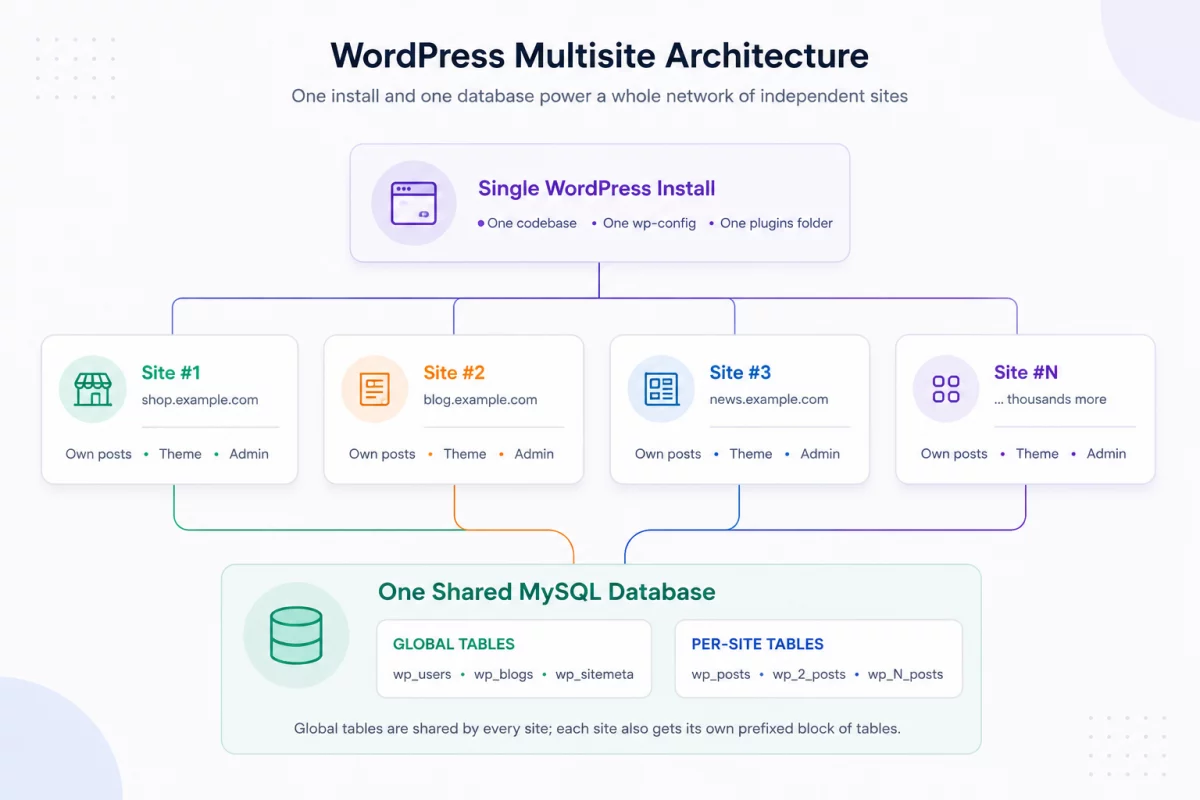
When you enable Multisite, WordPress adds a small set of tables across the network and then creates a new block of tables for each site you add.
That global table exists exactly once per network and stores everyone’s data:
wp_blogs— one line per site in the network.wp_site— the network itself.wp_sitemeta— network level options and settings.wp_users— each user, shared across the network.wp_usermeta— user metadata, also shared.
That table per site duplicated for each site, starting with the site’s numeric ID. The main site (site 1) uses plains wp_ prefix, while site 2 gets wp_2_site 3 got wp_3_etc.
So a network of 1,000 sites doesn’t have that posts tables — there are 1,000 of them: wp_posts, wp_2_posts, wp_3_posts … wp_1000_posts.
-- Global tables (one set per network)
wp_blogs
wp_blog_versions
wp_site
wp_sitemeta
wp_users
wp_usermeta
wp_registration_log
wp_signups

-- Per-site tables for the MAIN site (blog_id = 1)
wp_posts
wp_postmeta
wp_options
wp_terms
wp_term_taxonomy
wp_term_relationships
wp_comments
wp_commentmeta

-- Per-site tables for site #2 (blog_id = 2) — same shape, new prefix
wp_2_posts
wp_2_postmeta
wp_2_options
wp_2_terms
wp_2_term_taxonomy
wp_2_term_relationships
wp_2_comments
wp_2_commentmeta
This is the most important fact about Multisite storage: each site is its own island of tables, connected to the rest of the network through multiple shared global tables.
Why Prefixes Matter
Numerical prefixes are WordPress’ way of separating each site’s content while sharing a single database.
A post written on site 2 is saved at wp_2_posts and is not visible to normal queries on site 3, because it is read wp_3_posts. Nothing to share posts table and not site_id columns to filter — the split is physical, table by table.
Users are an intentional exception. Because wp_users has no prefix, an account exists once and can be given access to many sites simultaneously.
How WordPress Captures Data: Choosing the Right Site
Every request to a Multisite network starts the same way: WordPress has to know which site it is serving before it can load any content.
This is done at the beginning of the bootstrap, by matching the domain and entry path with wp_blogs table.
- The request came in for
shop.example.comorexample.com/shop. - WordPress looks for matches
blog_idin thewp_blogs. - That
blog_idsetting the table prefix for the rest of the request — egwp_5_. - Since then,
$wpdbjust read and write that site’s tables.
The object that holds all of this is global $wpdb. When the site is resolved, that is prefix the property is arranged, and the maid loves it $wpdb->posts automatically points to the right table.
<?php
// On site #5, these properties resolve to the site-specific tables.
global $wpdb;

echo $wpdb->prefix;   // "wp_5_"
echo $wpdb->posts;    // "wp_5_posts"
echo $wpdb->options;  // "wp_5_options"

// But user tables stay global — same for every site on the network.
echo $wpdb->users;    // "wp_users"
echo $wpdb->usermeta; // "wp_usermeta"
This is why users can log in once and move between sites: the users table never changes the prefix, while the content table does. The same thing $wpdb the object just points back to a different block of the table.
Reading Data From Other Sites
Sometimes you need to read data belonging to other sites in the network — for example, to display a site’s latest posts on other sites.
The correct way is switch_to_blog()which points back $wpdb on the target site so that your query reads that site’s tables. When you finish, restore_current_blog() return everything.
<?php
/**
 * Read the latest post title from another site in the network.
 * switch_to_blog() repoints $wpdb; restore_current_blog() undoes it.
 */
function latest_title_from_site( $blog_id ) {
    switch_to_blog( $blog_id );

    // Any query here now runs against this site's tables (e.g. wp_5_posts).
    $recent = get_posts( [
        'numberposts' => 1,
        'post_status' => 'publish',
    ] );

    $title = $recent ? get_the_title( $recent[0] ) : '';

    restore_current_blog(); // ALWAYS restore — pair every switch.

    return $title;
}
Rule to remember: always pair every switch_to_blog() with a restore_current_blog(). If you switch and forget to restore, every subsequent query in the request is silently read from the wrong site.
How Shared Data is Stored and Retrieved
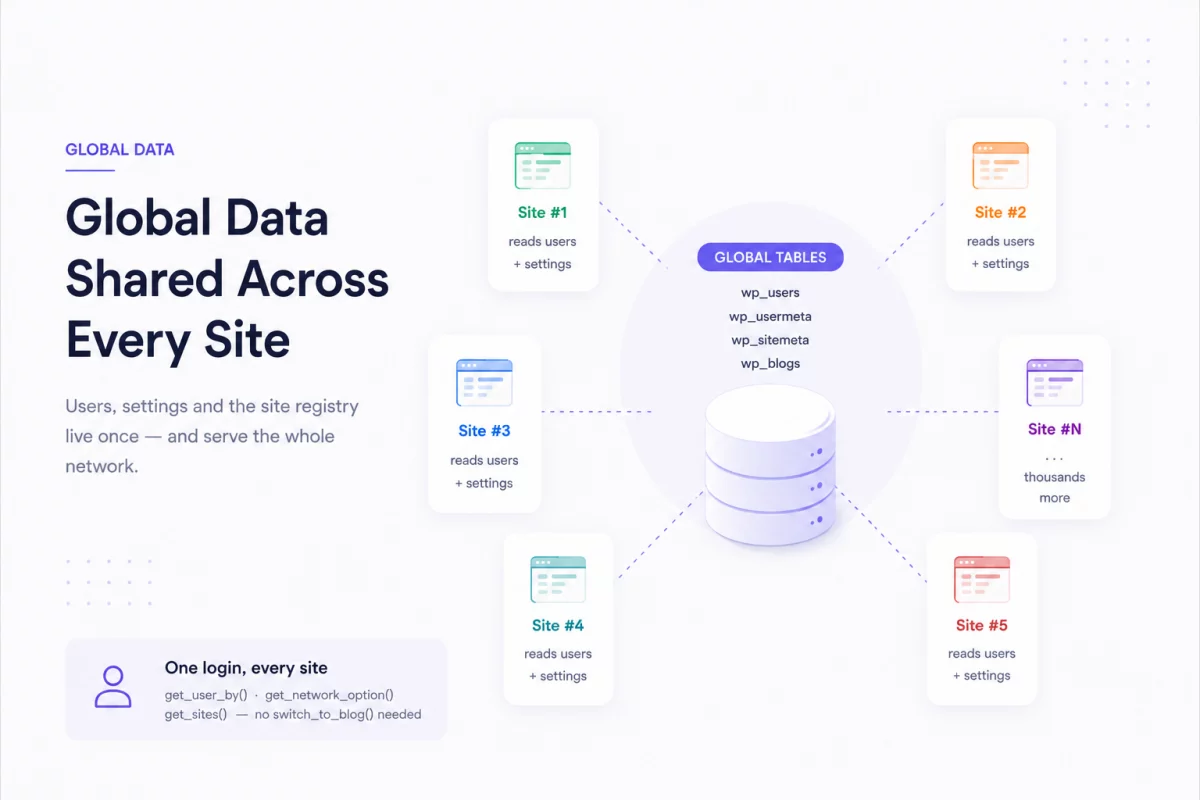
Not everything is in the table per site. Users, network settings, and site registries are all global — and WordPress gives you special functions to read them without switching sites at all.
Users and Capabilities
User records are saved once logged in wp_users. What changes occur on each site is user change ability — their role at each site.
These abilities are within it wp_usermeta under prefix key: wp_capabilities for the main site, wp_2_capabilities for site 2, and so on. One row in the global table, one capability key per user’s site.
<?php
// The user record itself is global — no switching required.
$user = get_user_by( 'email', '[email protected]' );

// Capabilities are per-site, stored as prefixed keys in wp_usermeta:
//   wp_capabilities   -> role on the main site
//   wp_2_capabilities -> role on site #2
//   wp_5_capabilities -> role on site #5

// Check which sites this user can access across the network.
$sites = get_blogs_of_user( $user->ID );
foreach ( $sites as $site ) {
    echo $site->blogname . ' — ' . $site->siteurl . "\n";
}
Network Options
Site-specific settings are stored on each site wp_options table and read with get_option(). Settings across networks are different — it’s in-house wp_sitemeta and read with get_network_option().
<?php
// Per-site setting — comes from this site's wp_options (e.g. wp_5_options).
$site_title = get_option( 'blogname' );

// Network-wide setting — comes from the global wp_sitemeta table.
$network_setting = get_network_option( null, 'my_network_setting' );

// Storing them works the same way, in the matching table:
update_option( 'my_site_setting', 'value' );                  // wp_5_options
update_network_option( null, 'my_network_setting', 'value' ); // wp_sitemeta
Site Registry
That wp_blogs the table is an index of the entire network — each site, its domain, path, and state. Rather than asking it manually, WordPress gives you get_sites()which is cached and filterable.
<?php
// Retrieve the list of sites from the global wp_blogs registry.
$sites = get_sites( [
    'public'   => 1,
    'archived' => 0,
    'deleted'  => 0,
] );

foreach ( $sites as $site ) {
    echo $site->blog_id . ': ' . $site->domain . $site->path . "\n";
}

// Get details for a single site without switching into it.
$details = get_blog_details( 5 );
echo $details->blogname; // the name of site #5
Putting It All Together
Each piece of data in a Multisite network falls into one of two buckets, and knowing which piece tells you exactly where the data is and how to read it.
| Data | Where is it stored | How to take it back |
|---|---|---|
| Posts, pages, comments | Per site: wp_N_posts, wp_N_comments | Normal query on the current site; switch_to_blog() for others |
| Site options | Per site: wp_N_options | get_selection() |
| User | Global: wp_users | get_user_by(), get_users() |
| Role/capabilities | Global: wp_usermeta (prefix key) | user_can(), get_blogs_of_user() |
| Network settings | Global: wp_sitemeta | get_network_option() |
| Site registry | Global: wp_blogs | get_sites(), get_blog_details() |
Conclusion
WordPress Multisite shares users, network settings, and site data in global tables, while each site stores its own content in separate prefix tables for efficient management.
WordPress Multisite stores shared data in global tables and site content in prefixed tables. WordPress automatically completes the correct tables, making cross-site data easy to manage.

PakarPBN
A Private Blog Network (PBN) is a collection of websites that are controlled by a single individual or organization and used primarily to build backlinks to a “money site” in order to influence its ranking in search engines such as Google. The core idea behind a PBN is based on the importance of backlinks in Google’s ranking algorithm. Since Google views backlinks as signals of authority and trust, some website owners attempt to artificially create these signals through a controlled network of sites.
In a typical PBN setup, the owner acquires expired or aged domains that already have existing authority, backlinks, and history. These domains are rebuilt with new content and hosted separately, often using different IP addresses, hosting providers, themes, and ownership details to make them appear unrelated. Within the content published on these sites, links are strategically placed that point to the main website the owner wants to rank higher. By doing this, the owner attempts to pass link equity (also known as “link juice”) from the PBN sites to the target website.
The purpose of a PBN is to give the impression that the target website is naturally earning links from multiple independent sources. If done effectively, this can temporarily improve keyword rankings, increase organic visibility, and drive more traffic from search results.