When automating web applications with Selenium WebDriver, you may encounter elements that cannot be located using standard methods. This often happens when working with Shadow DOM in Selenium, where elements are encapsulated inside a Shadow Root and cannot be accessed through typical locators.
Because these elements are not part of the regular DOM tree, trying to interact with them directly will usually result in errors like NoSuchElementException. To automate elements inside a Shadow DOM, you need to first retrieve the Shadow Root and then locate the elements within it.
Overview
What Is Shadow DOM in Selenium?
Shadow DOM in Selenium refers to web elements that live inside a special, encapsulated part of the DOM tree created by the browser, called the Shadow Root.
These elements are hidden from the regular DOM structure, so standard Selenium locators like XPath or basic CSS selectors cannot access them directly.
How to Find Shadow DOM in Selenium?
Web elements inside Shadow DOM are inaccessible with standard locators. Selenium offers two ways to interact with them: using the getShadowRoot() method or JavaScriptExecutor.
- getShadowRoot() Method: The getShadowRoot() method in Selenium 4 provides direct Shadow Root access, letting testers locate and interact with encapsulated elements using automation commands.
- JavaScriptExecutor: JavaScriptExecutor executes JavaScript to pierce Shadow DOM, accessing elements via shadowRoot and querySelector, ideal for older Selenium versions and deeply nested components difficult to automate.
How to Automate Shadow DOM in Selenium?
Automating Shadow DOM in Selenium involves setting up frameworks to handle shadow-root elements, typically using TestNG for test execution and Maven to manage project dependencies and builds.
- Using TestNG: TestNG organizes Selenium Shadow DOM tests using classes, annotations, and assertions, supporting parallel execution, reporting, dependencies, simplifying automation of component interactions within Shadow Roots.
- Using Maven: Maven manages dependencies and builds for Shadow DOM automation, ensuring consistent Selenium and TestNG execution across environments, while integrating with CI/CD for automated continuous testing.
What Is Shadow DOM?
Shadow DOM is a functionality that allows the web browser to render elements of Document Object Model (DOM) without putting them into the main document DOM tree. This creates a barrier between what the developer and the browser can reach.
The developer cannot access the Shadow DOM the same way they would with nested elements, while the browser can render and modify that code the same way it would with nested elements.
By implementing it, you can keep the style and behavior of one part of the document hidden and separate from the other code of the same document so that there is no interference.
Shadow DOM allows hidden DOM trees to be attached to elements in the regular DOM tree – the Shadow DOM tree starts with a Shadow Root, underneath which you can attach any element in the same way as the normal DOM.
Check out this blog to learn more about Shadow Root in Selenium.
Here are some Shadow DOM terminologies:
- Shadow Host: The regular DOM node to which the Shadow DOM is attached.
- Shadow Tree: The DOM tree inside the Shadow DOM.
- Shadow Boundary: The place where the Shadow DOM ends and the regular DOM begins.
- Shadow Root: The root node of the Shadow tree.
Why Use Shadow DOM in Selenium?
Shadow DOM in Selenium lets you access and test elements hidden from the normal DOM. It ensures stable locators and accurate interaction with modern web components.
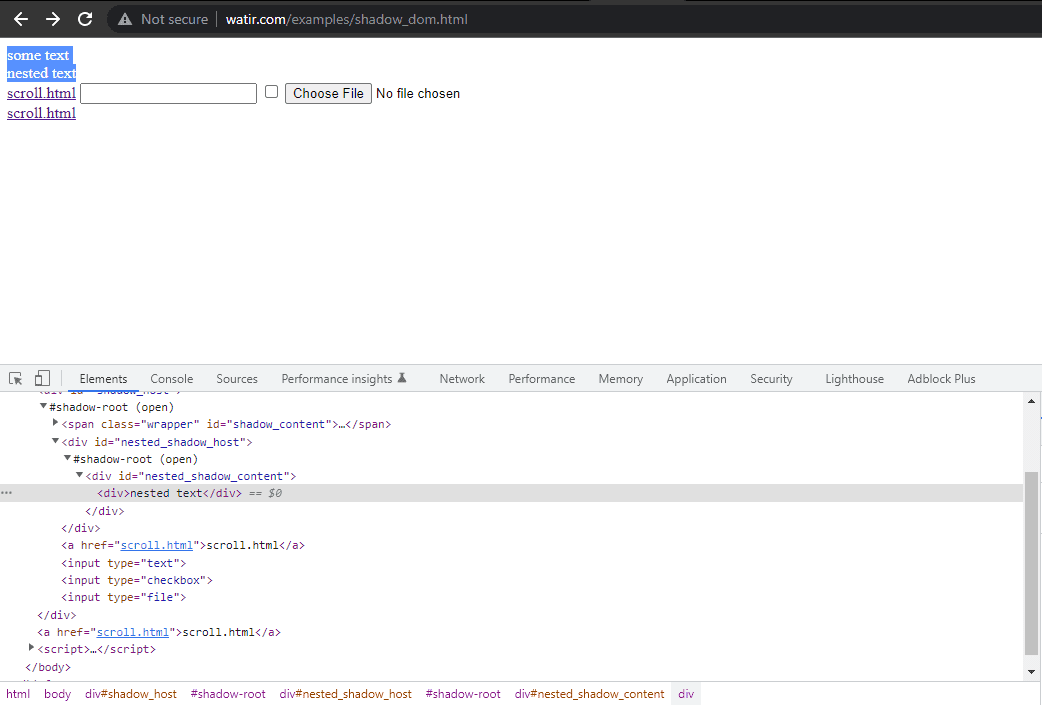
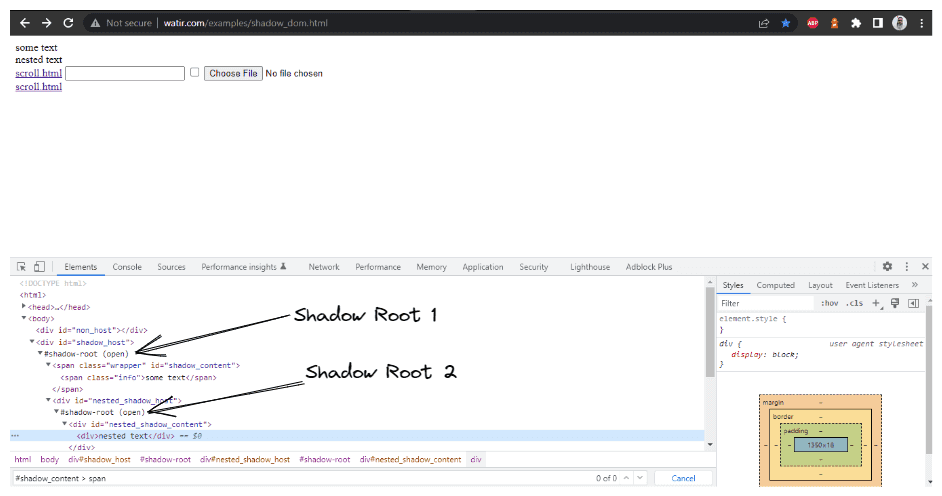
Let’s take an example of the Watir Homepage and try to assert the Shadow DOM and the nested Shadow DOM text with Selenium WebDriver. Note it has 1 Shadow Root element before we reach text -> some text, and there are 2 Shadow Root elements before we reach the text > nested text.
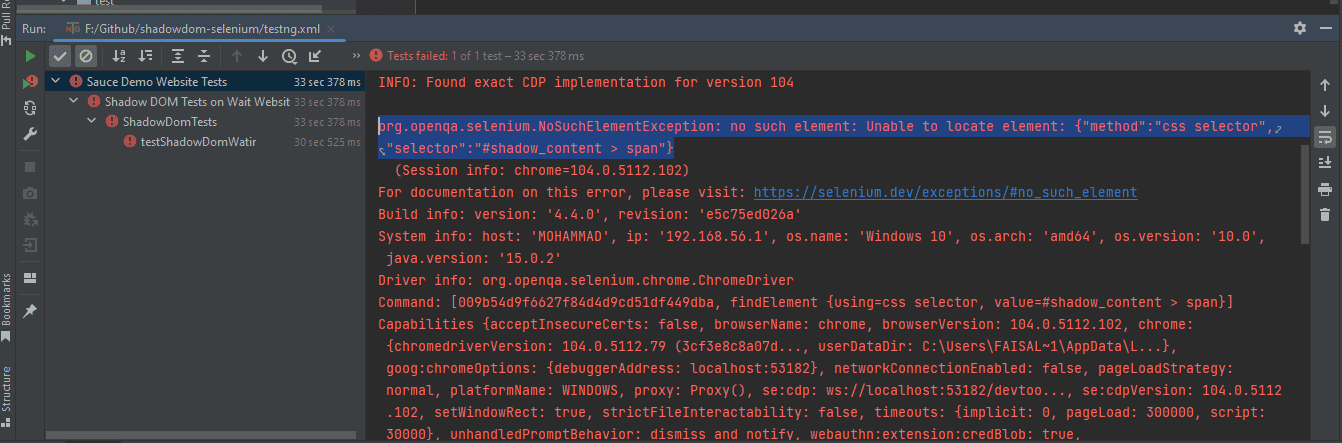
Now, if we try to locate the element using the cssSelector(“#shadow_content > span”), it doesn’t get located, and Selenium WebDriver will throw NoSuchElementException.
To avoid NoSuchElementException in Selenium and locate the element correctly for the text, we need to go through the Shadow Root elements. Only then would we be able to locate “some text” and “nested text” on the page.
How to Find Shadow DOM Elements Using Selenium WebDriver?
You can use getShadowRoot() and JavaScriptExecutor to access Shadow DOM. It returns a ShadowRoot for direct element access, handles nested shadow trees, and throws NoSuchShadowRootException if none exists.
How to Find Shadow DOM Using getShadowRoot() Method?
Selenium 4 introduced getShadowRoot() to access Shadow DOM elements directly from a Shadow Host. It returns a ShadowRoot object, which lets you interact with the component’s Shadow DOM. If no Shadow Root exists, it throws NoSuchShadowRootException.
As discussed earlier, this project on Shadow DOM in Selenium has been created using Maven. TestNG framework is used as a test runner. To learn more about Maven, you can go through this Maven tutorial for Selenium testing.
Once the project is created, we need to add the dependency for Selenium WebDriver and TestNG in the pom.xml file.
Versions of the dependencies are set in a separate properties block. This is done for maintainability, so if we need to update the versions, we can do it easily without searching the dependency throughout the pom.xml file.
Let’s move on to the test script of HomePage class. The Page Object Model (POM) has been used in this project as it helps reduce code duplication and improve test case maintenance.
|
1 2 3 4 5 6 7 8 9 10 11 12 13 14 15 16 17 18 19 20 21 22 23 24 25 26 27 28 29 30 31 32 33 34 35 36 37 38 39 40 41 42 43 44 45 46
|
public class HomePage {
public SearchContext expandRootElement (WebElement element) { SearchContext shadowRoot = (SearchContext) ((JavascriptExecutor) getDriver ()).executeScript ( “return arguments[0].shadowRoot”, element); return shadowRoot; } public String getSomeText () { return getDriver ().findElement (By.cssSelector (“#shadow_content > span”)) .getText (); }
public String getShadowDomText () { WebElement shadowHost = getDriver ().findElement (By.id (“shadow_host”)); SearchContext shadowRoot = shadowHost.getShadowRoot (); String text = shadowRoot.findElement (By.cssSelector (“#shadow_content > span”)) .getText (); return text; }
public String getNestedShadowText () { WebElement shadowHost = getDriver ().findElement (By.id (“shadow_host”)); SearchContext shadowRoot = shadowHost.getShadowRoot (); WebElement shadowContent = shadowRoot.findElement (By.cssSelector (“#nested_shadow_host”)); SearchContext shadowRootTwo = shadowContent.getShadowRoot (); String nestedText = shadowRootTwo.findElement (By.cssSelector (“#nested_shadow_content > div”)).getText (); return nestedText; }
public String getNestedText() { WebElement nestedText = getDriver ().findElement (By.id (“shadow_host”)).getShadowRoot () .findElement (By.cssSelector (“#nested_shadow_host”)).getShadowRoot () .findElement (By.cssSelector (“#nested_shadow_content > div”)); return nestedText.getText (); }
public String getNestedTextUsingJSExecutor () { WebElement shadowHost = getDriver ().findElement (By.id (“shadow_host”)); SearchContext shadowRootOne = expandRootElement (shadowHost); WebElement nestedShadowHost = shadowRootOne.findElement (By.cssSelector (“#nested_shadow_host”)); SearchContext shadowRootTwo = expandRootElement (nestedShadowHost); return shadowRootTwo.findElement (By.cssSelector (“#nested_shadow_content > div”)) .getText ();
} } |

First, we would find the locator for “some text” and “nested text” on HomePage.
|
1 2 3 4 5 6 7 8 9 10 11 12 13 14 15 16 17 18 19 20 21 22 23 24 25 26 27 28 29 30 31 32 33 34 35 36 37 38 39 40 41 42 43 44 45 46
|
public class HomePage {
public SearchContext expandRootElement (WebElement element) { SearchContext shadowRoot = (SearchContext) ((JavascriptExecutor) getDriver ()).executeScript ( “return arguments[0].shadowRoot”, element); return shadowRoot; } public String getSomeText () { return getDriver ().findElement (By.cssSelector (“#shadow_content > span”)) .getText (); }
public String getShadowDomText () { WebElement shadowHost = getDriver ().findElement (By.id (“shadow_host”)); SearchContext shadowRoot = shadowHost.getShadowRoot (); String text = shadowRoot.findElement (By.cssSelector (“#shadow_content > span”)) .getText (); return text; }
public String getNestedShadowText () { WebElement shadowHost = getDriver ().findElement (By.id (“shadow_host”)); SearchContext shadowRoot = shadowHost.getShadowRoot (); WebElement shadowContent = shadowRoot.findElement (By.cssSelector (“#nested_shadow_host”)); SearchContext shadowRootTwo = shadowContent.getShadowRoot (); String nestedText = shadowRootTwo.findElement (By.cssSelector (“#nested_shadow_content > div”)).getText (); return nestedText; }
public String getNestedText() { WebElement nestedText = getDriver ().findElement (By.id (“shadow_host”)).getShadowRoot () .findElement (By.cssSelector (“#nested_shadow_host”)).getShadowRoot () .findElement (By.cssSelector (“#nested_shadow_content > div”)); return nestedText.getText (); }
public String getNestedTextUsingJSExecutor () { WebElement shadowHost = getDriver ().findElement (By.id (“shadow_host”)); SearchContext shadowRootOne = expandRootElement (shadowHost); WebElement nestedShadowHost = shadowRootOne.findElement (By.cssSelector (“#nested_shadow_host”)); SearchContext shadowRootTwo = expandRootElement (nestedShadowHost); return shadowRootTwo.findElement (By.cssSelector (“#nested_shadow_content > div”)) .getText ();
} } |
Code Walkthrough:
- expandRootElement(): Uses JavaScript to manually return the Shadow Root of a given element, serving as a fallback when getShadowRoot() is not used.
- getSomeText(): Retrieves text from a standard DOM element using a CSS selector, without interacting with Shadow DOM.
- getShadowDomText(): Locates the Shadow Host, accesses its Shadow Root using getShadowRoot(), and then reads text from within the Shadow DOM.
- getNestedShadowText(): Handles nested Shadow DOM by accessing a second-level Shadow Root and extracting text from deeper elements.
- getNestedText()/getNestedTextUsingJSExecutor(): Demonstrate two ways to handle nested Shadow DOM: direct Selenium chaining and step-by-step expansion using JavaScript.
 Note
NoteAutomate Shadow DOM with cloud Selenium Grid. Try LambdaTest Today!
How to Find Shadow DOM Using JavaScriptExecutor?
To access Shadow DOM elements using JavaScriptExecutor, execute a script that traverses the shadow roots. First, locate the Shadow Host element using standard selectors, then use element.shadowRoot to access the shadow DOM.
Let’s now see how to locate the Shadow Root elements using JavaScriptExecutor in Selenium WebDriver.
getNestedTextUsingJSExecutor() method has been created inside the HomePage Class, where we would be expanding the Shadow Root element based on the WebElement, we pass in the parameter.
Since in the DOM (as shown in the screenshot above), we saw that there are two Shadow Root elements we need to expand before we get to the actual locator for getting the text – nested text. Hence, the expandRootElement() method is created instead of copy-pasting the same JavaScriptExecutor code every time.
We would implement the SearchContext interface to help us with the JavaScriptExecutor and return the Shadow Root element based on the WebElement we pass in the parameter.
|
|
public SearchContext expandRootElement (final WebElement element) { return (SearchContext) ((JavascriptExecutor) getDriver ()).executeScript (“return arguments[0].shadowRoot”, element); }
public String getNestedShadowText () { final WebElement shadowHost = getDriver ().findElement (By.id (“shadow_host”)); final SearchContext shadowRoot = shadowHost.getShadowRoot (); final WebElement shadowContent = shadowRoot.findElement (By.cssSelector (“#nested_shadow_host”)); final SearchContext shadowRootTwo = shadowContent.getShadowRoot (); return shadowRootTwo.findElement (By.cssSelector (“#nested_shadow_content > div”)) .getText (); } |
Code Walkthrough:
- expandRootElement(): Uses JavaScript to return the Shadow Root of a given element, enabling access when direct Shadow DOM handling is required.
- getNestedShadowText(): Locates the main shadow_host element that contains the first Shadow DOM.
- First Shadow Root: Calls getShadowRoot() on the Shadow Host to access its internal structure.
- Nested Shadow Host: Finds nested_shadow_host inside the first Shadow Root and retrieves its own Shadow Root.
- Final Text Extraction: Reads and returns text from the deeply nested element inside the second Shadow DOM layer.
How to Automate Shadow DOM in Selenium WebDriver?
There are two main ways to run tests for automating Shadow DOM in Selenium. You can execute them directly from your IDE using TestNG for quick development and debugging, or run them from the command line using Maven, which is useful for automated builds and continuous integration setups.
How to Automate Shadow DOM Using TestNG?
You can use TestNG to run Selenium scripts that access Shadow Root through JavaScriptExecutor and locate inner elements. Execute the test from IDE or suite XML to validate Shadow DOM actions.
TestNG is used as a test runner. Hence, testng.xml has been created, using which we will run the tests by right-clicking on the file and selecting the option Run ‘…\testng.xml’. This file will be placed inside the root folder of the project.
To achieve scalability and reliability and test across different environments, we’ll run the tests on automation testing platforms such as LambdaTest.
LambdaTest offers an online Selenium Grid of over 3000 real browsers and operating systems to help you automate Shadow DOM in Selenium on the cloud. You can accelerate your Selenium testing with TestNG and reduce test execution time by multiple folds by running parallel tests on multiple browsers and OS configurations.
To get started, check out this guide on Selenium TestNG testing on LambdaTest.
But before running the tests, add the LambdaTest Username and Access Key. You can them from your Account Settings > Password & Security. Now add these credentials in the Run Configurations since we are reading the LambdaTest Username and Access Key from System Property.
Add values in the Run Configuration as mentioned below:
- Dusername = <LambdaTest username>
- DaccessKey = <LambdaTest accesskey>
|
1 2 3 4 5 6 7 8 9 10 11 12 13 14 15 16 17 18 19 20 21 22 23 24 25 26
|
<?xml version=“1.0” encoding=“UTF-8”?> <!DOCTYPE suite SYSTEM “http://testng.org/testng-1.0.dtd”> <suite name=“Shadow DOM Automation Tests”> <test name=“Shadow DOM Tests on Watir Website”> <parameter name=“browser” value=“remote-chrome”/> <classes> <class name=“ShadowDomTests”> <methods> <include name=“testShadowDomWatir”/> </methods> </class> </classes> </test> <!— Test —> <test name=“Shadow DOM Tests on Selenium Playground Website”> <parameter name=“browser” value=“remote-chrome”/> <classes> <class name=“ShadowDomTests”> <methods> <include name=“testShadowDomSeleniumPlayground”/> </methods> </class> </classes> </test> <!— Test —>
</suite> |
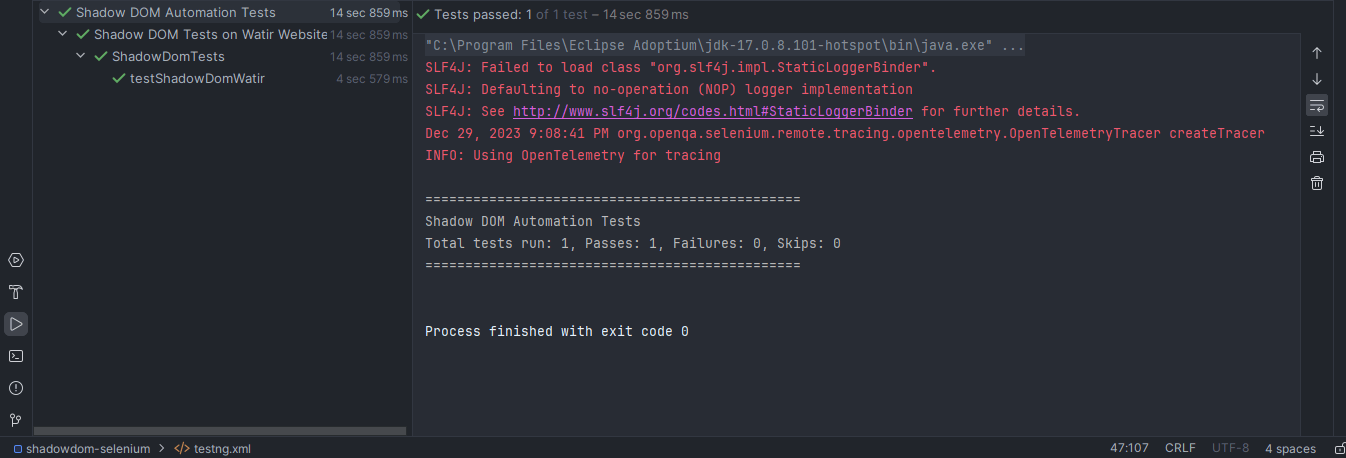
Here is the screenshot of the test run locally for Shadow DOM in Selenium using Intellij IDE.
How to Automate Shadow DOM Using Maven?
To automate Shadow DOM using Maven, configure pom.xml with Selenium and TestNG, then run mvn test so the build executes scripts that access shadowRoot via JavaScriptExecutor for stable UI validation.
To run the tests using Maven, the following steps need to be run to automate Shadow DOM in Selenium:
- Open Command Prompt or your IDE Terminal.
- Navigate to the root folder of the project.
- Type the command: mvn clean install -Dusername=<LambdaTest username> -DaccessKey= <LambdaTest accessKey>
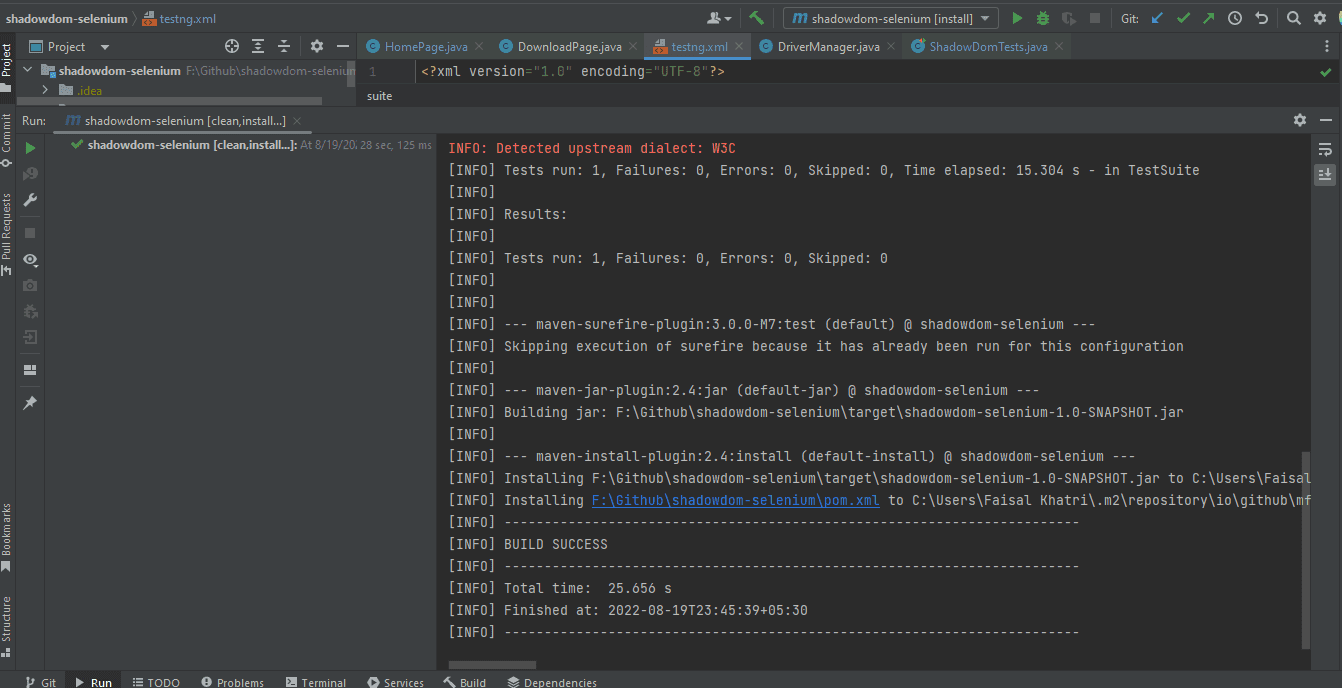
Following is the screenshot from IntelliJ, which shows the execution status of the tests using Maven:
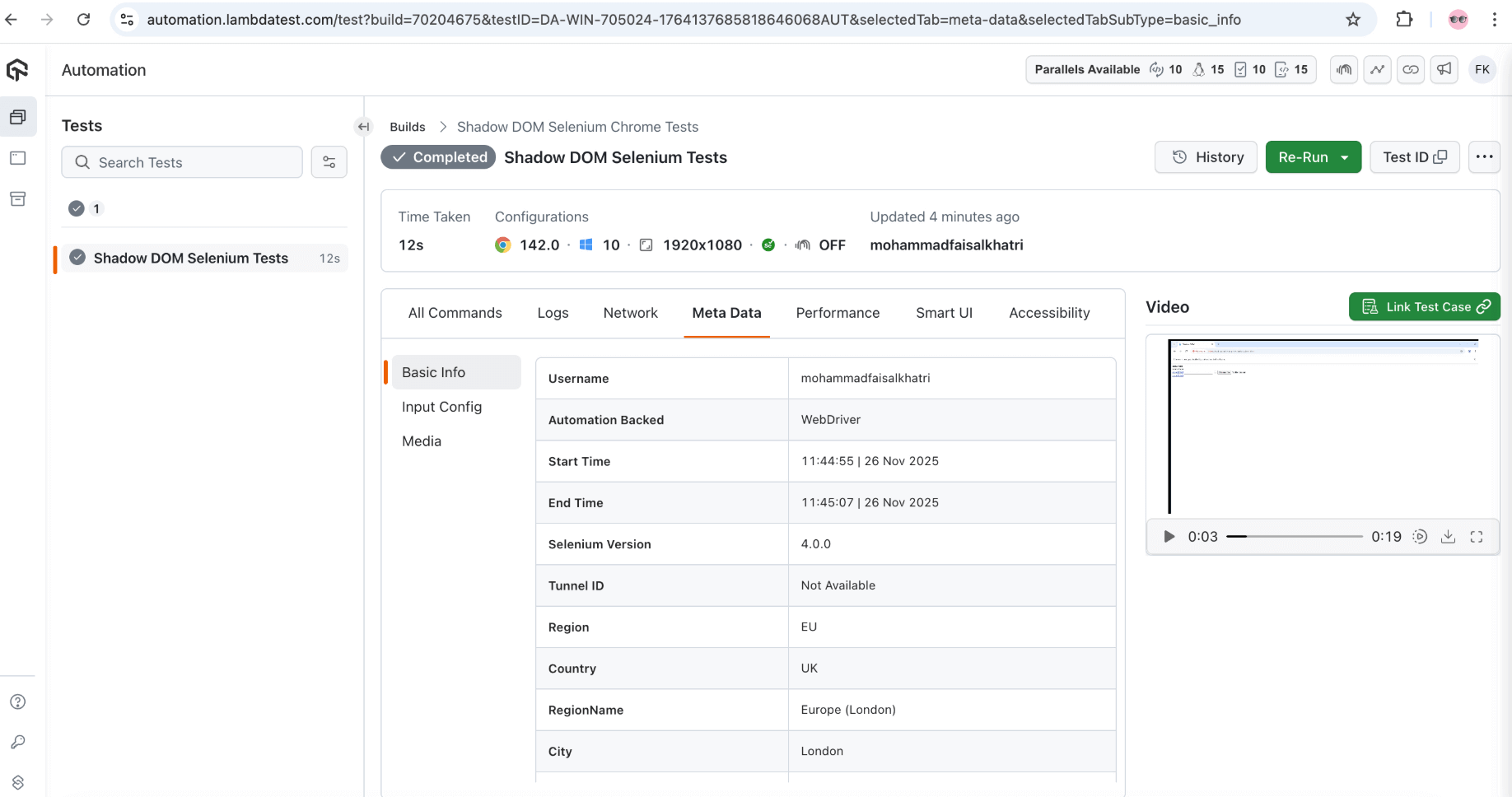
Once the tests are run successfully, we can go to the LambdaTest Web Automation Dashboard and view all the video recordings, screenshots, device logs, and step-by-step granular test run details.
Conclusion
In this blog on automating Shadow DOM in Selenium, we discussed finding Shadow DOM elements and automating them using the getShadowRoot() method introduced in the Selenium 4 and above version.
We also discussed locating and automating the Shadow DOM in Selenium WebDriver using JavaScriptExecutor and running the tests on the LambdaTest platform, which shows granular details of the tests run with Selenium WebDriver logs.
Citations
Finding web elements:
Frequently Asked Questions (FAQs)
Why can’t Selenium find elements inside Shadow DOM with normal locators?
Regular Selenium locators stop at the shadow boundary because the browser isolates those elements on purpose. Selenium only recognizes the host but not what lives inside it. To work with internal elements, you must explicitly access the Shadow Root using JavaScript-based methods before locating anything further.
How do you access open Shadow Root elements in Selenium?
You can access an open Shadow Root by executing JavaScript that returns the shadowRoot of the host element. Once retrieved, you can apply querySelector on it like usual. It feels indirect, but it gives precise control over deeply nested component elements during automation.
Why does Selenium fail on closed Shadow Roots?
Closed Shadow Roots block external access by design. Browsers intentionally prevent scripts from reading or modifying these internal nodes. Selenium respects this restriction, meaning you cannot directly interact with inner elements and must rely on the component’s public behavior instead.
Can XPath locate elements inside Shadow DOM?
XPath cannot traverse a shadow boundary because the shadow tree is isolated from the standard DOM structure. Even advanced expressions fail quietly. The practical workaround is using JavaScript to expose the Shadow Root and then targeting elements with CSS selectors inside it.
How do nested Shadow DOMs impact automation?
Nested shadow structures increase complexity and reduce script reliability. Each layer requires individual handling which slows execution and increases fragility. A small UI change inside one layer can break the entire flow, making careful planning and structure awareness essential for stability.
Is using JavaScript executor risky for Shadow DOM?
JavaScript executor is safe when used with discipline. It bypasses Selenium’s visibility limits without compromising browser behavior. Issues only appear when scripts ignore timing, scope, or structure, leading to brittle automation that breaks during normal UI rendering changes.
How do explicit waits behave with Shadow DOM?
Explicit waits do not automatically recognize shadow content. Selenium waits for elements it cannot see because the Shadow Root isn’t resolved first. You must manually fetch the shadow context before applying waits, otherwise you risk unnecessary timeouts and misleading failures.
Are browser dev tools helpful when dealing with Shadow DOM?
Developer tools are extremely useful for visualizing shadow structures. They show where the Shadow Root begins and how elements are organized inside it. This insight helps you design smarter selectors and avoid guesswork when building Selenium automation logic.
Why do modern frameworks rely heavily on Shadow DOM?
Frameworks use Shadow DOM to prevent style and behavior conflicts between components. It creates predictable, self contained UI blocks. While beneficial for design consistency, this isolation adds complexity for testers trying to access and validate hidden internal elements.
What is the best strategy for automating Shadow DOM-heavy apps?
Treat shadow components as independent systems. Use reusable helper functions to access Shadow Roots and apply strict locator discipline. Combine structure awareness with stable waits to create automation that remains dependable even as components evolve and layouts shift.

News
Berita
News Flash
Blog
Technology
Sports
Sport
Football
Tips
Finance
Berita Terkini
Berita Terbaru
Berita Kekinian
News
Berita Terkini
Olahraga
Pasang Internet Myrepublic
Jasa Import China
Jasa Import Door to Door