At 9:14 on a Tuesday, a customer buys the last two docking hubs from your Adobe Commerce (Magento 2) store.
Then at 9:16, your sales rep sells four of the same hubs to a trade customer at the counter, because her screen also says four are available.
Both numbers came from the same system. Both were wrong.
Nobody made a mistake. The stock figure simply had no way of knowing that someone had already sold two of those hubs.
So this is the point where a growing store starts to need an Adobe Commerce ERP integration.
This guide explains what an ERP does, why Adobe Commerce needs one, and how each feature works in practice.
What is an ERP?
ERP stands for Enterprise Resource Planning. However, the name is heavier than the idea.
An ERP is one shared database that every team works from. Buying, stock, the warehouse, the sales desk and the accounts all read and write to the same place.
So when one team changes something, everyone else sees it straight away.
There is a second rule that goes with it. In an ERP, nobody changes stock by simply editing a number.
Instead, every unit arrives, moves or leaves on a document — a goods receipt, a transfer, a stock count or a delivery. Each document carries a date, an owner and a status.
That is the whole idea. Everything below follows from it.
Why does an Adobe Commerce store need an ERP?
Adobe Commerce sells very well. It shows your catalogue, applies your discounts, takes the payment and handles several stores and currencies at once.
Five questions Adobe Commerce cannot answer
But now try asking your Adobe Commerce admin these five questions:
- Which supplier still owes us 200 units, and when will they arrive? Adobe Commerce has never heard of a purchase order, so that date sits in someone’s inbox.
- Why does the shelf hold 47 when the system says 52? Adobe Commerce stores the current number. It does not store how you got there.
- Of the 60 units we own, how many have we already sold? Adobe Commerce cannot tell you, because sold and unsold stock look exactly the same.
- What did the stock in that warehouse cost us? Adobe Commerce knows selling prices, but it does not track cost or stock value.
- The supplier sent 30 of the 36 we ordered. Where do the other 6 go? Nowhere. Someone writes them on a sticky note.
Each of those questions is really a question about a document, and Adobe Commerce’s stock system does not have any.
The same day, run two ways
Here is what that gap looks like on a normal working day.
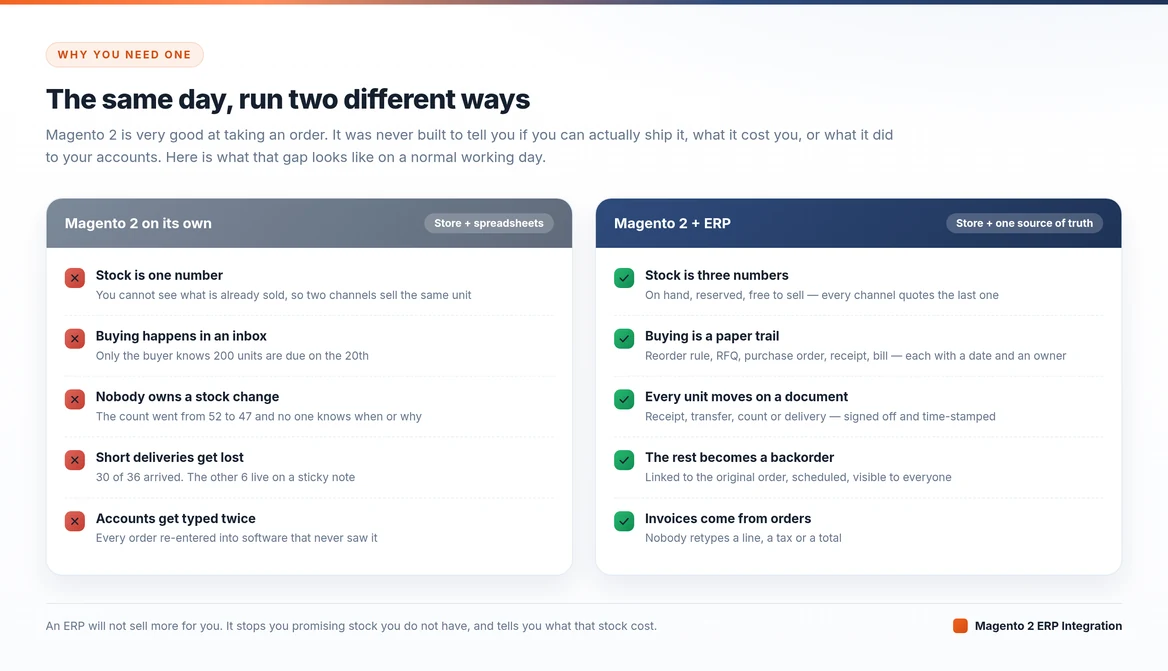
There is a simple test. If closing your month means exporting to a spreadsheet, chasing your buyer for supplier dates, and typing orders into accounting software by hand, then you already do ERP work.
You just do it manually.
Start with Adobe Commerce’s own Multi-Source Inventory
Before you buy anything, first switch on the part you already own.
Multi-Source Inventory (MSI) ships with Adobe Commerce. It ended the days of one stock number per product.
You list your real inventory sources — warehouses, shops, storage units, even a dropshipper’s shelf — and then group them into stocks. Each sales channel points at the stock that serves it.
Adobe Commerce then works out a salable quantity for each stock. When a customer places an order, Adobe Commerce puts a reservation against that quantity.
As a result, your store will not sell the same unit twice while the picker is still walking to the shelf.
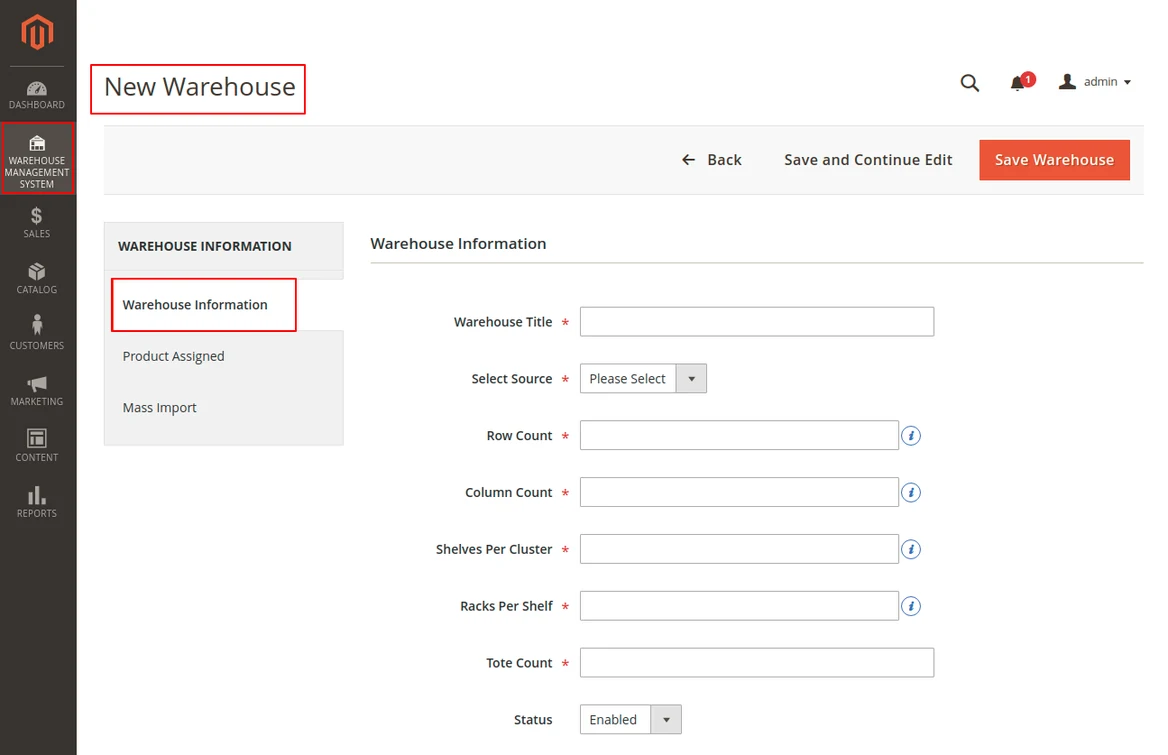
Every ERP feature below builds on those sources. In fact, Webkul’s warehouse and dropship extensions map their warehouses straight onto MSI sources, as you can see here.
Where MSI stops
MSI does not give you the paperwork on either side of the shelf.
There is no supplier, no purchase order, no goods receipt, no cost price, no supplier bill, no stock value, and no memory of a half-finished delivery. In short, MSI tells you where your stock sits.
An ERP tells you how it got there, what it cost, who owns it, and what it did to your accounts.
How Adobe Commerce and the ERP split the work
With any Adobe Commerce ERP integration, the temptation is to sync everything in both directions. However, if a field has two owners, it really has none, and your prices will flip back and forth.
So give every piece of data one home.
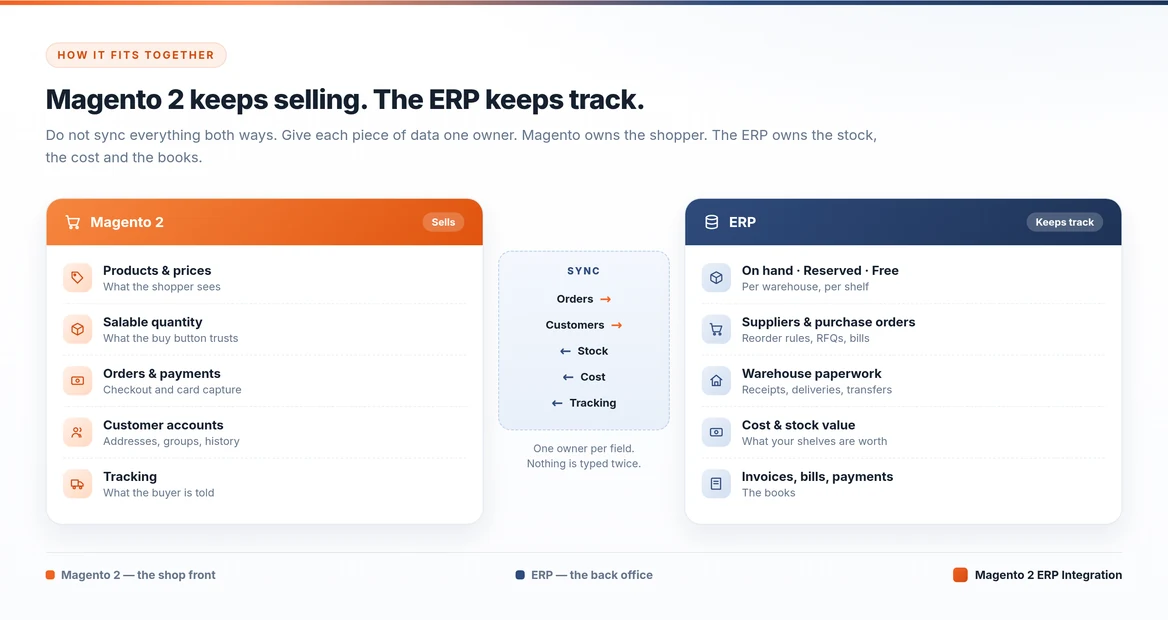
Orders and customers travel into the ERP, because that is where they turn into work. Stock, cost and tracking numbers travel back out to Adobe Commerce, because that is what the shopper needs to see.
Nobody types anything twice, so nothing can disagree with itself.
ERP features for Adobe Commerce
Here is the full list before we walk through it. Every block is work your team already does somewhere, usually in a spreadsheet.
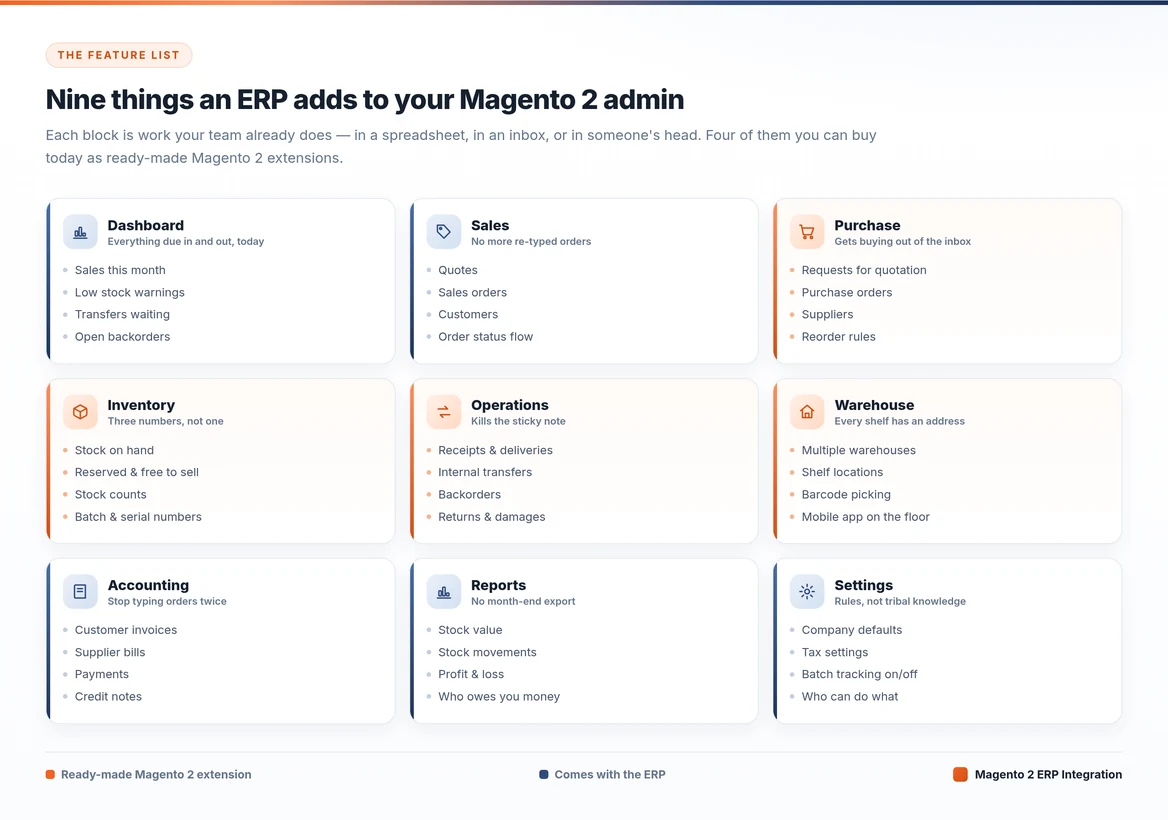
Of course, you do not have to buy all of it at once. Four of these already exist as ready-made Adobe Commerce extensions, and they work together.
1. Inventory Management
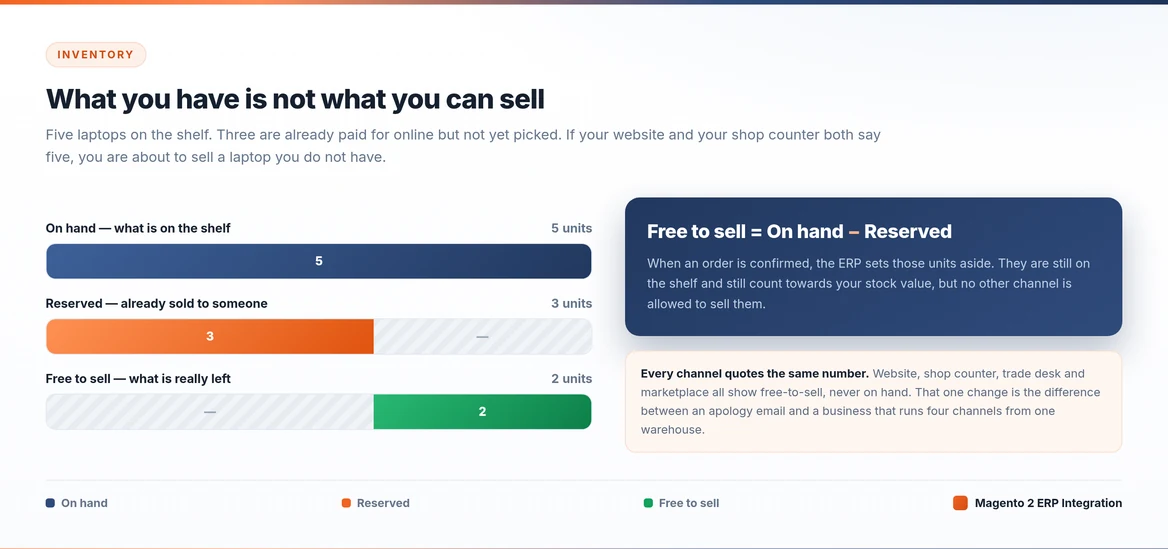
This feature fixes the Tuesday morning at the top of this article. It replaces one stock number with three.
Free to sell, not on hand
When you confirm a sales order, the ERP reserves those units. They still sit on the shelf and still count towards your stock value, but someone has already bought them.
So no other channel can sell them.
Free to sell = On hand − Reserved
Your website, your shop counter, your trade desk and your marketplace listings all quote free to sell, never on hand.
That single change lets you run several sales channels from one warehouse without overselling.
Why incoming stock never counts
One detail catches people out: a goods receipt never reserves stock. Reserving only protects stock that a customer has already bought.
An incoming delivery is an expectation, not stock, and it counts only once someone counts it in.
If your ERP reserves against incoming paperwork, then sooner or later it will promise a customer something that still sits on a lorry.
Inventory management also gives you stock value at cost, reorder rules with a minimum and maximum per warehouse, and batch and serial numbers.
Those numbers matter enormously on the day you need a recall.
2. Warehouse Management
Warehouse management either earns its money or gets ignored. It has two halves, and most people only do the first.
Give every shelf an address
A warehouse is not one place. Rather, it is a set of locations — a goods-in bay, sellable stock, a quality check area, packing, and damaged goods.
Stock sits in a specific spot, not simply “in the warehouse”. Each site can also number its own documents, so a growing network stays readable.
Put it in the picker’s hand
Here is the half people skip, and skipping it is why ERP projects fail. If the system only opens on an office desktop, your warehouse staff will work around it.
Once they work around it, your numbers go wrong again.
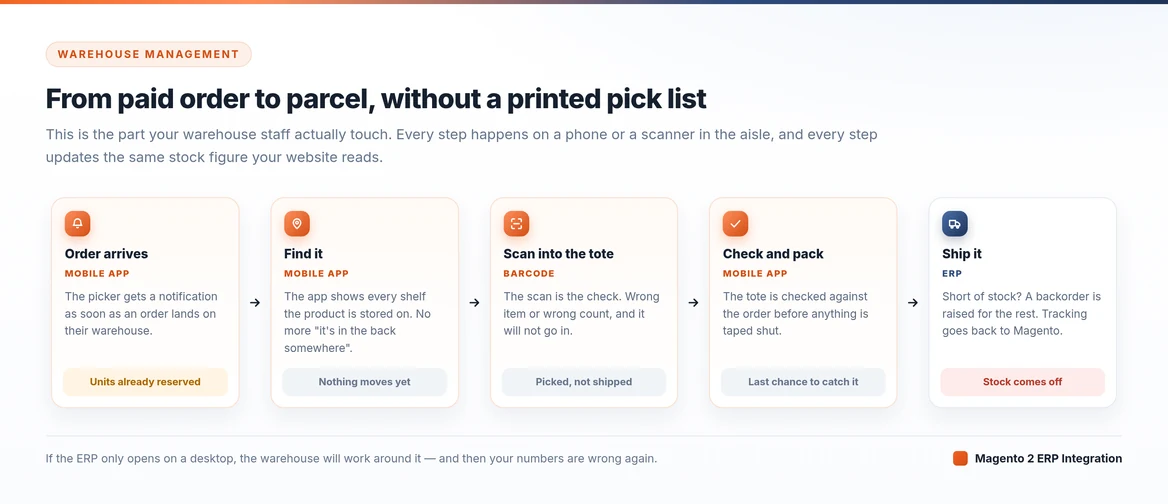
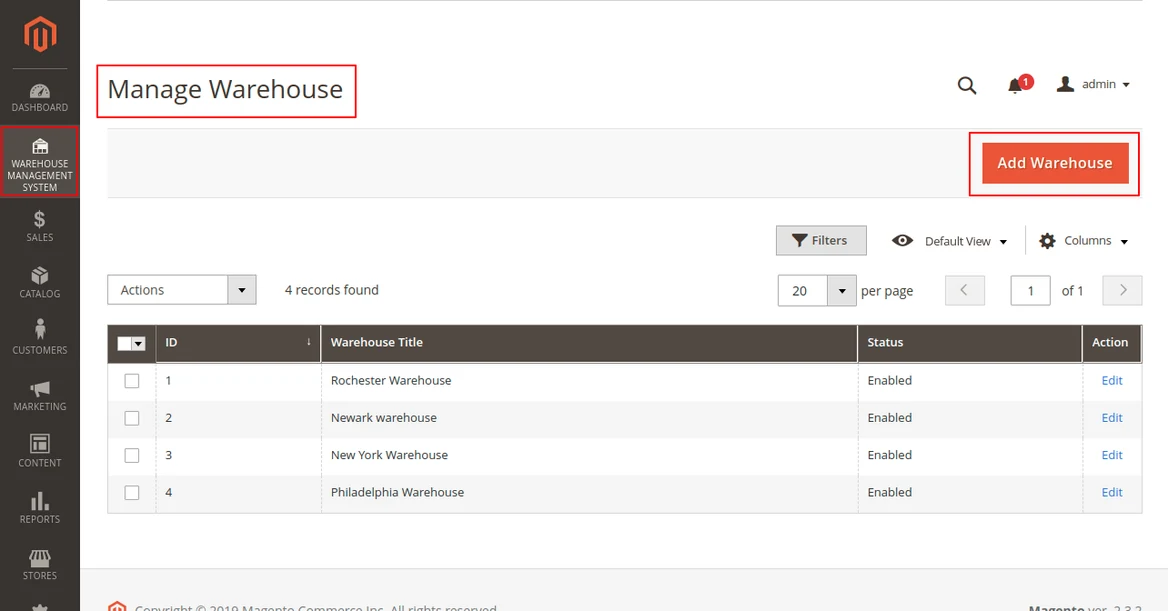
The WMS Mobile App for Magento 2 covers that second half. You create several warehouses, then assign both MSI sources and staff to them. Products from a source join the warehouse automatically.
A product can sit in several positions, and staff can see all of them. When you assign an order, the picker gets a push notification.
Next, they scan the product barcode into a tote, and someone checks that tote before it goes into a box.
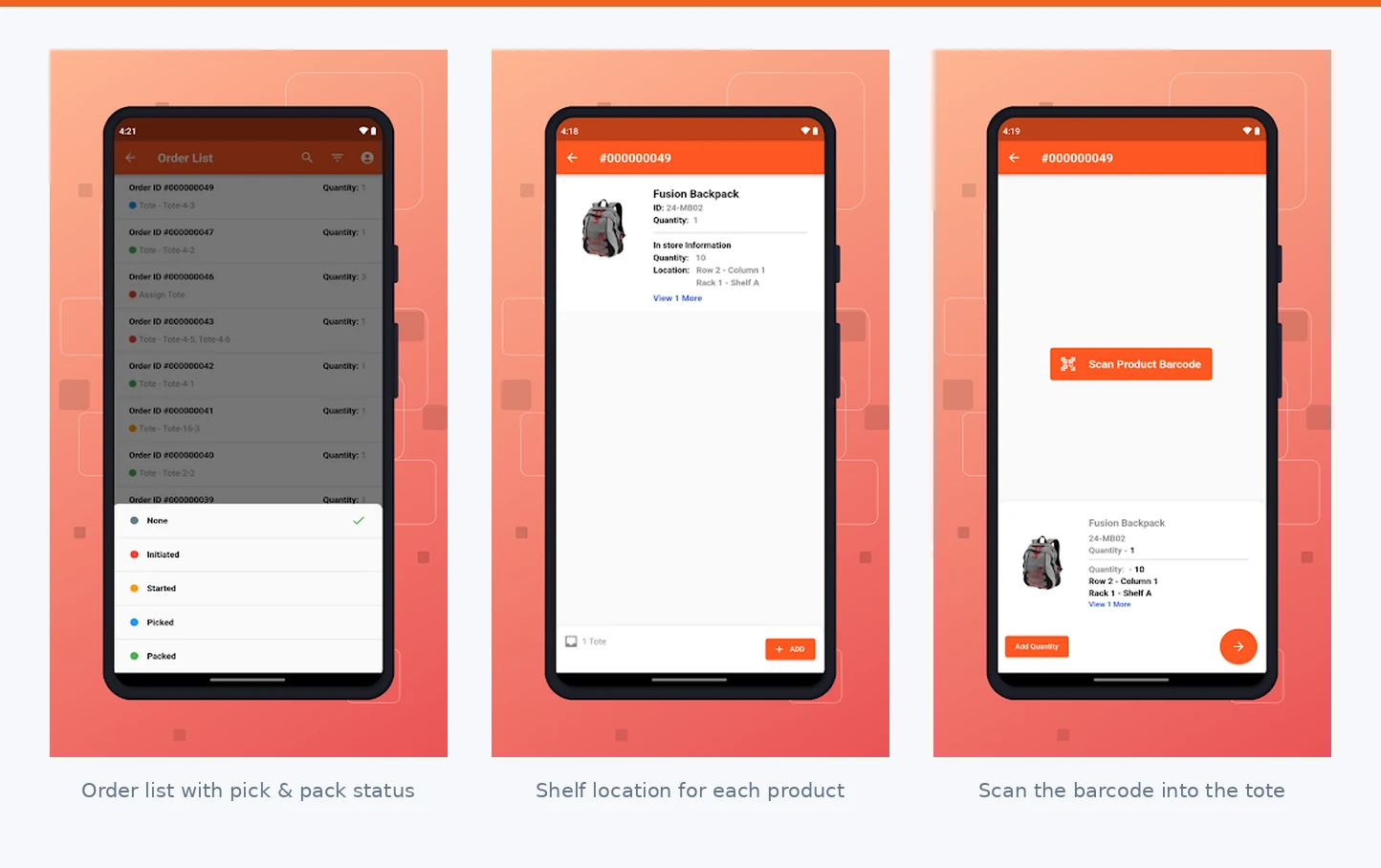
Add Barcode Inventory Management and your stock counts, goods receipts and picking all run at scanner speed instead of keyboard speed.
The result is not glamorous, but it is the whole point. The right product reaches the right customer, while the number in Adobe Commerce stays correct without anyone typing it.
3. Purchase Order Management
Most Adobe Commerce merchants fly blind on the buying side, because the whole supply chain lives in one person’s email.
An ERP turns buying into a chain of linked documents, and each one has an owner and a date.
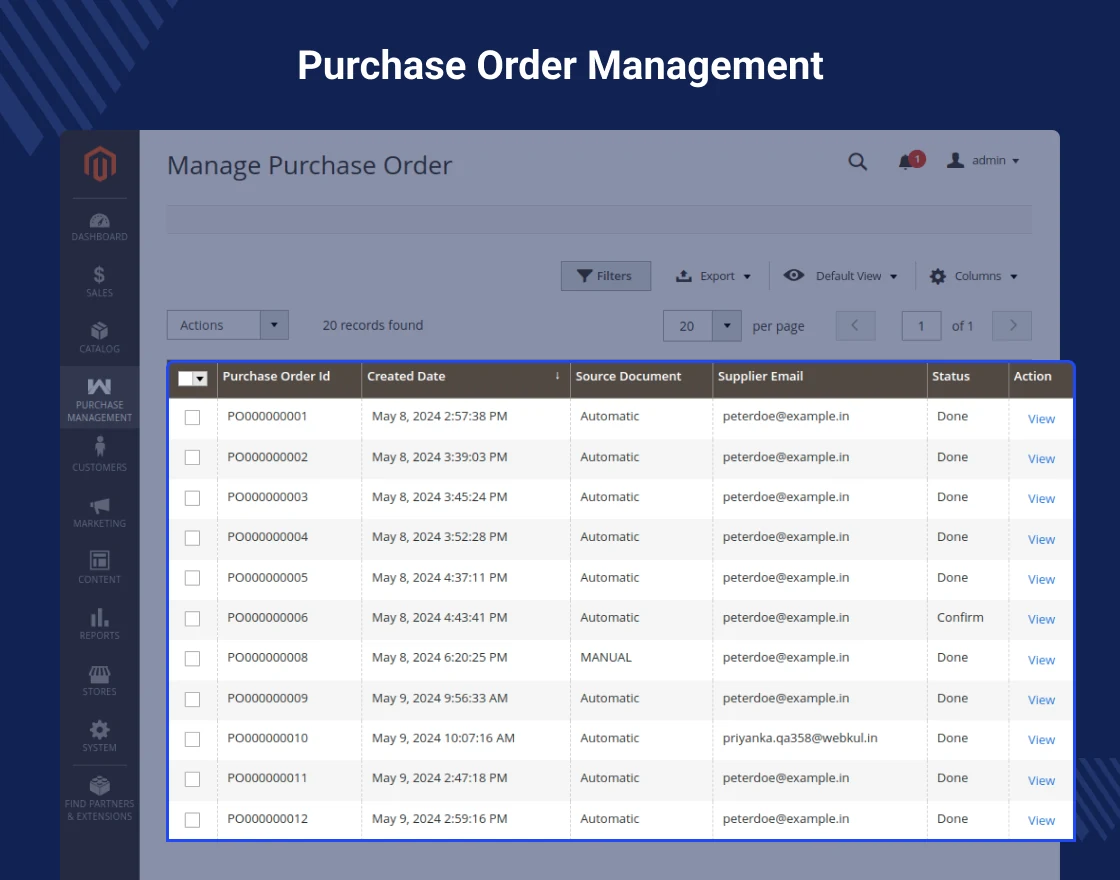
Reordering that starts on its own
A reorder rule watches each product in each warehouse. Say you hold 8 monitors, with a minimum of 12 and a maximum of 50.
Then the system suggests ordering 42, well before your customers ever see “out of stock”.
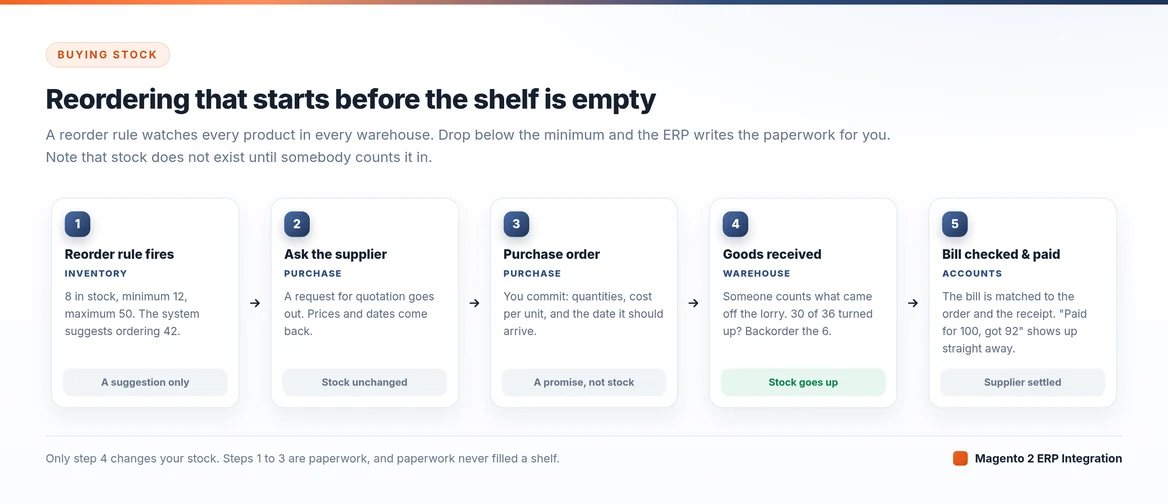
First you send a request for quotation. Prices and dates come back. Next you accept, and it becomes a purchase order with quantities, cost per unit and an arrival date that everyone can see.
Nothing is yours until someone counts it
Then comes the rule everything else depends on. When the goods arrive, you create a goods receipt — and creating it changes nothing at all.
Stock only moves once a person confirms that receipt, and the amount that goes in is the amount they actually counted.
Any system that adds stock the moment you place a purchase order tells you a comfortable lie.
Finally, you check the supplier bill against both the purchase order and the goods receipt. If you paid for 100 and got 92, you see it immediately instead of finding out at year end.
If buying is the only gap you want to close this quarter, then Purchase Management for Magento 2 does exactly this on its own.
It covers suppliers, quotations, purchase orders and incoming shipments, and it raises quotations automatically when stock drops too low.
4. Sales Order Management
In Adobe Commerce, an order is a record. In an ERP, an order is a job that starts other jobs.
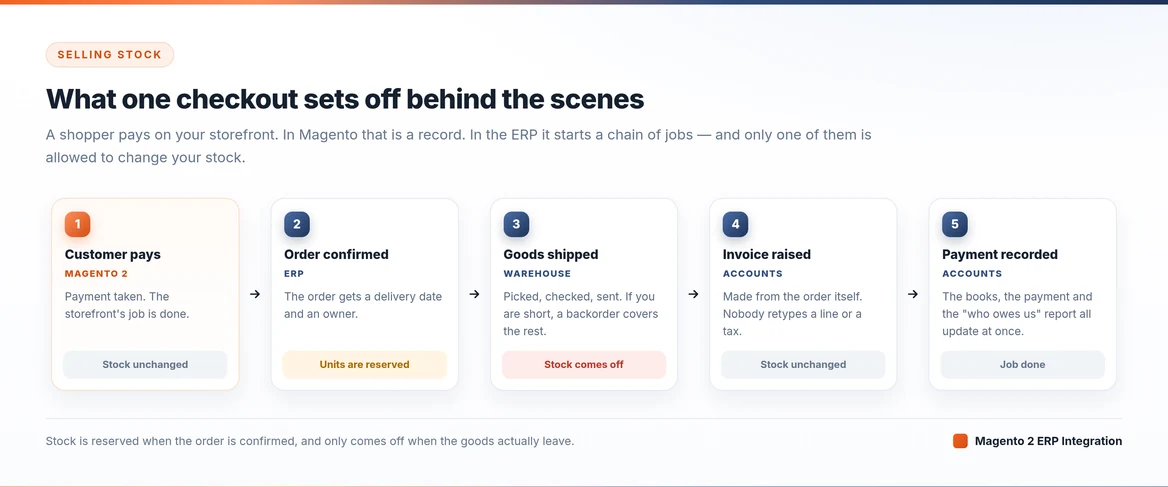
The stages stay simple: Draft, Confirmed, Delivered, Invoiced. Confirming the order reserves the stock. Creating the delivery builds the warehouse document for you, already filled in.
Creating the invoice sends a draft to accounts. Quotes work the same way in reverse, so you send one, the customer accepts it, and one click turns it into an order.
Notice where stock actually moves. The ERP reserves it when you confirm the order, and it only comes off when the goods leave the building.
5. Backorder Management
Warehouses ship partial orders all the time. So the only question that matters is what happens to the part you did not ship.
Say a delivery covers six laptops and you only have three. When you confirm it, the ERP should stop and ask what to do with the other three.
Either they become their own delivery, linked to the original and scheduled for later, or you cancel them on purpose. What they must never do is quietly disappear.
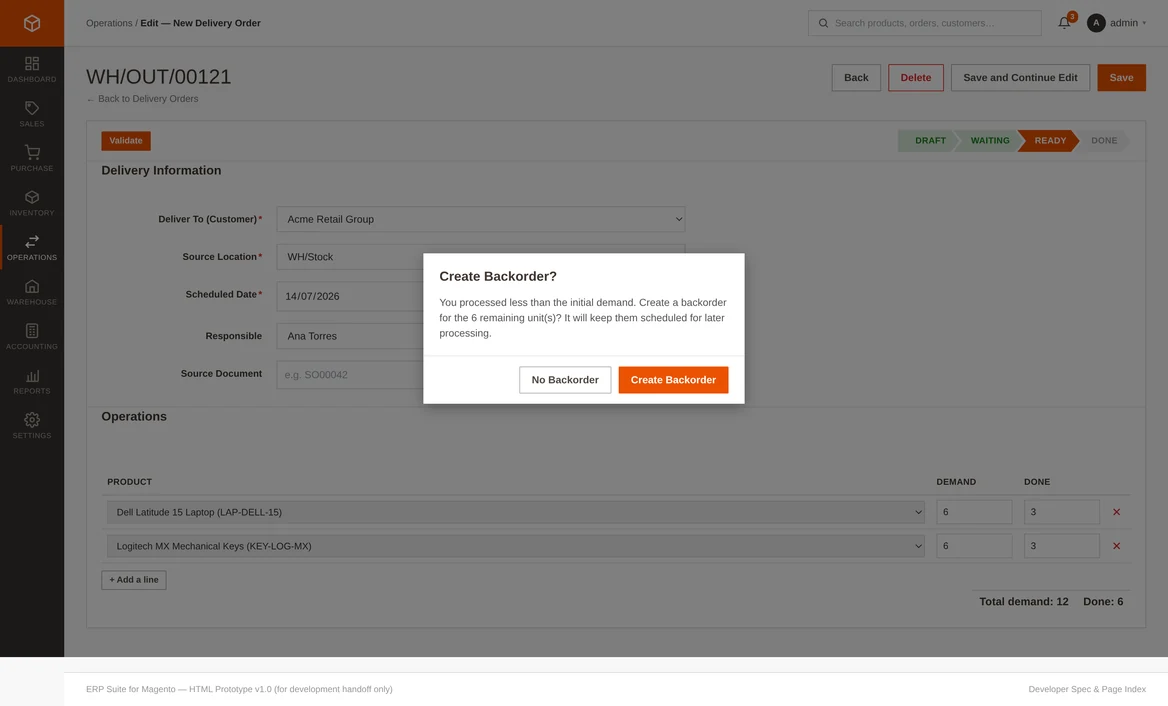
The same logic works for goods coming in. Your supplier sent 30 of 36? Then confirm the 30, raise a backorder for the 6, and the purchase order stays open and honest.
All these open backorders sit on one screen. Customer service can see which orders wait on stock, while your buyer can see which suppliers still owe you units.
As a result, nobody opens a spreadsheet, and nobody tells a customer “it’s on its way” without knowing whether it is.
6. Internal Transfers and Stock Counts
These two sound like housekeeping. In fact, they are where stock accuracy is won or lost.
Moving stock between locations
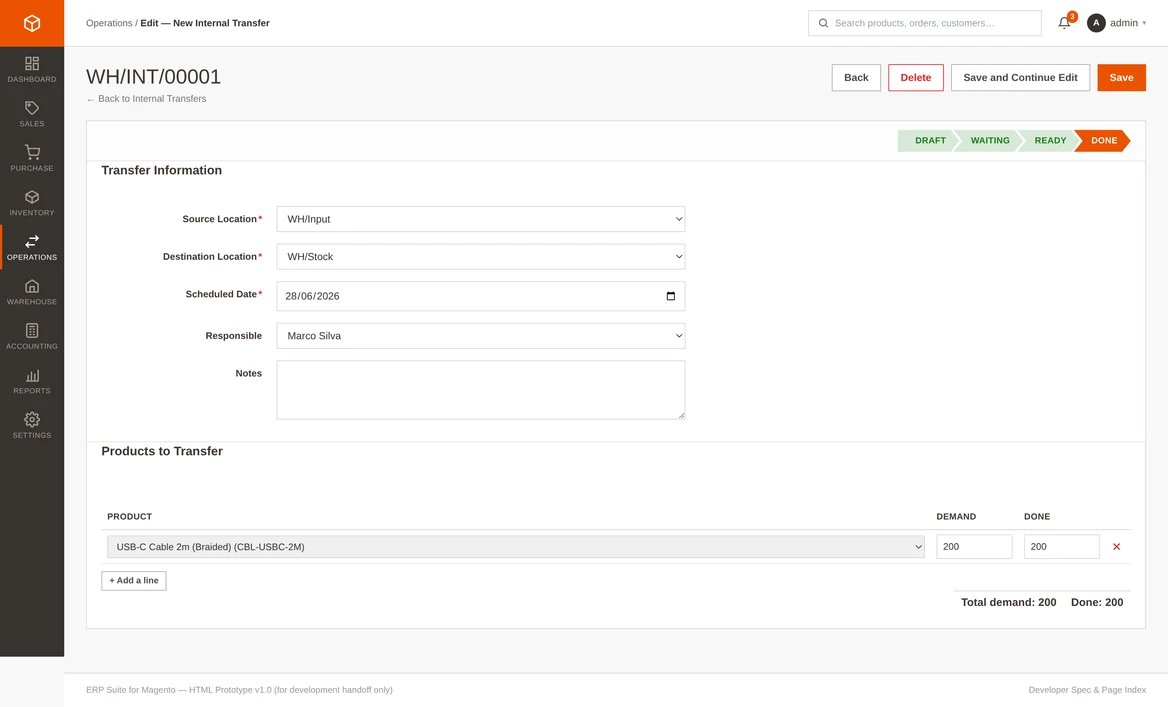
Internal transfers move stock between warehouses and locations — from the main warehouse to a regional one, from the goods-in bay to sellable stock, or from sellable stock to a quality check.
It follows the same pattern as everything else: a document, an owner and a status. If only half the pallet turns up, you raise a backorder for the rest.
Counting what is really there
Stock counts compare what you counted against what the system thinks. You type in the counted figure, look at the differences, and apply them.
Your stock then matches reality, and the system records the difference rather than hiding it. That is why a stock take becomes a routine job instead of a yearly panic.
You also write damaged goods off to a scrap location. Returns move stock in the right direction, depending on whether goods come back from a customer or go back to a supplier.
7. Point of Sale
If you sell over a counter as well as online, then your till is simply another channel asking the same question. It needs the same answer.
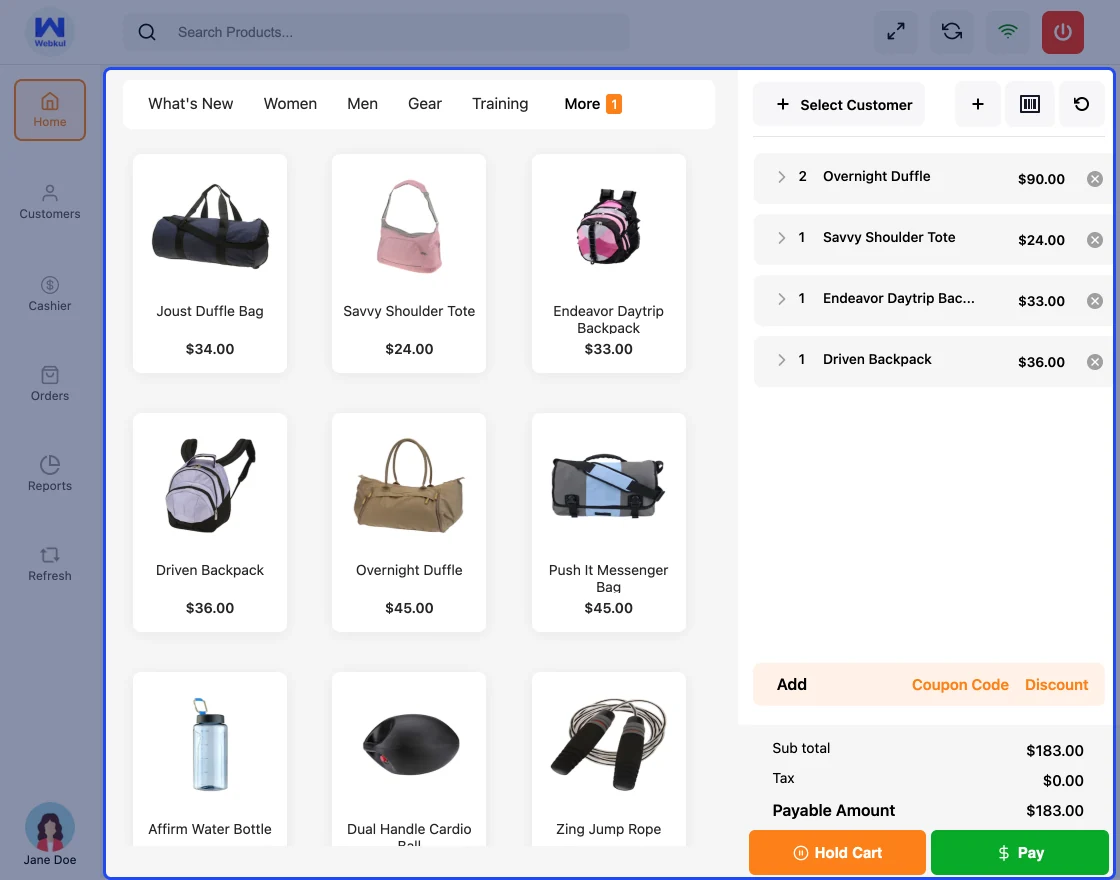
Point of Sale for Magento 2 connects each shop to an inventory source, so a counter sale and a website order both draw on the same free-to-sell figure.
Without that link, your POS is just another spreadsheet with a cash drawer attached.
8. Dropshipping
Dropshipping asks the same stock question from the other end. The goods sit on someone else’s shelf, but the promise to the customer is still yours.
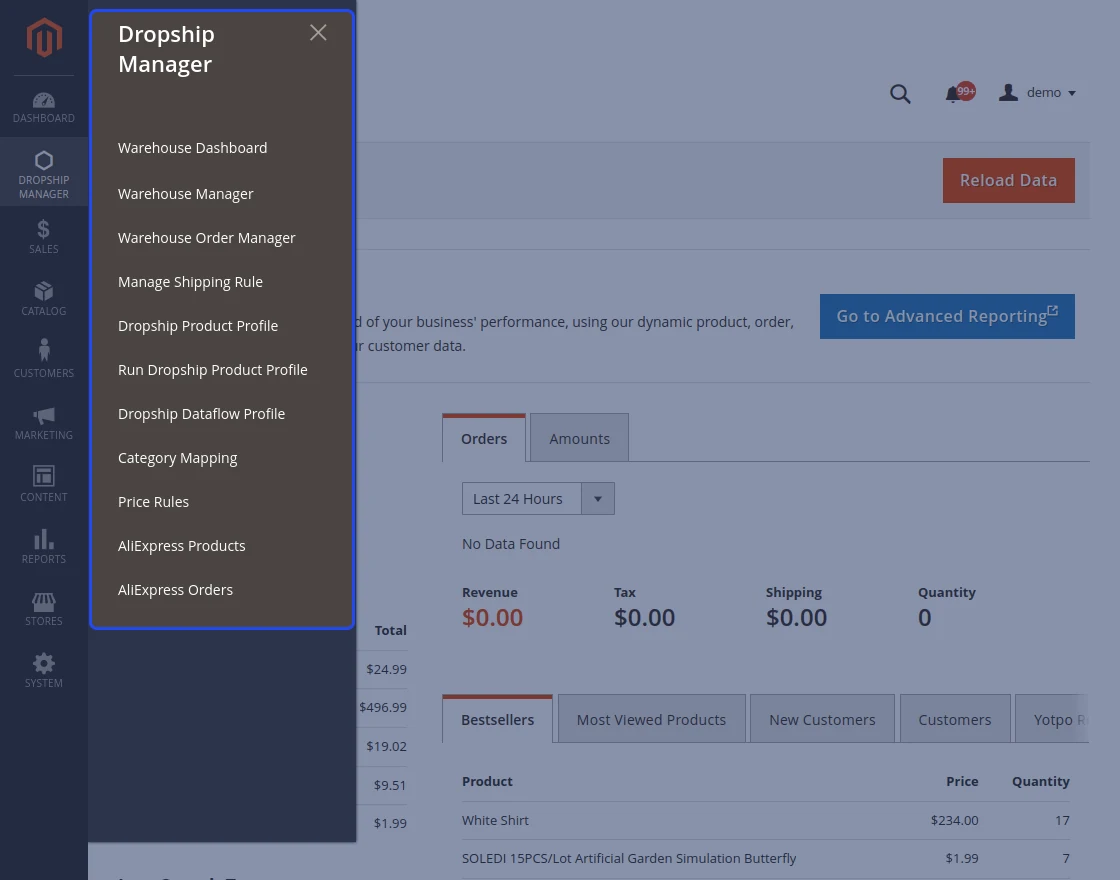
The Dropship extension for Magento 2 treats each supplier warehouse as its own source. Warehouse managers get their own logins.
You set pricing and shipping rules for each warehouse, import products in bulk, and the system can even place orders with the supplier for you, including from AliExpress.
Because each supplier is a source, the free-to-sell logic still works for goods you never touch.
And since a product can belong to several warehouses, the order goes to whichever one can actually fulfil it.
9. Marketplace and Multi-Vendor
A marketplace breaks most of the assumptions above. The stock is not yours, the money is not all yours, and the person who needs to know about a purchase order does not work for you.
Seller stock, seller orders, commissions and payouts must all reach the ERP. Otherwise you will spend every Friday reconciling three systems by hand.
Multi Vendor ERP Integration for Magento 2 syncs sellers and their products from Adobe Commerce into Odoo.
It pushes each seller’s orders across, keeps seller transactions and payments in step, and carries your marketplace settings too — commission rates, auto product approval and auto seller approval.
Sellers’ products can even get approval from the ERP side.
10. Accounting and Invoicing
Because invoices come from sales orders and bills come from purchase orders, your finance team stops being a typing pool.
You post the invoice, record the payment, and that is that. The payment, the ledger entry and the “who owes us money” report all update together.
You also get customer invoices, supplier bills, payments in and out, credit notes, a chart of accounts, and tax rules.
There is one simple test of whether this feature is real: nobody should ever type an order number into accounting software again.
11. Reports and Stock Value
Every document in this article writes to the same place. So reporting stops being a monthly export job and becomes a view of the work your team did today.
You get sales and purchase reports, stock value at cost, a full history of stock movements, profit and loss, a balance sheet, and lists of who owes you money and who you owe.
Above all, you can click any number and trace it back to the document behind it. A number you cannot trace is not a report. It is a guess.
Which document is allowed to move stock
This is the rule the whole system rests on. Print it and stick it above the packing bench.
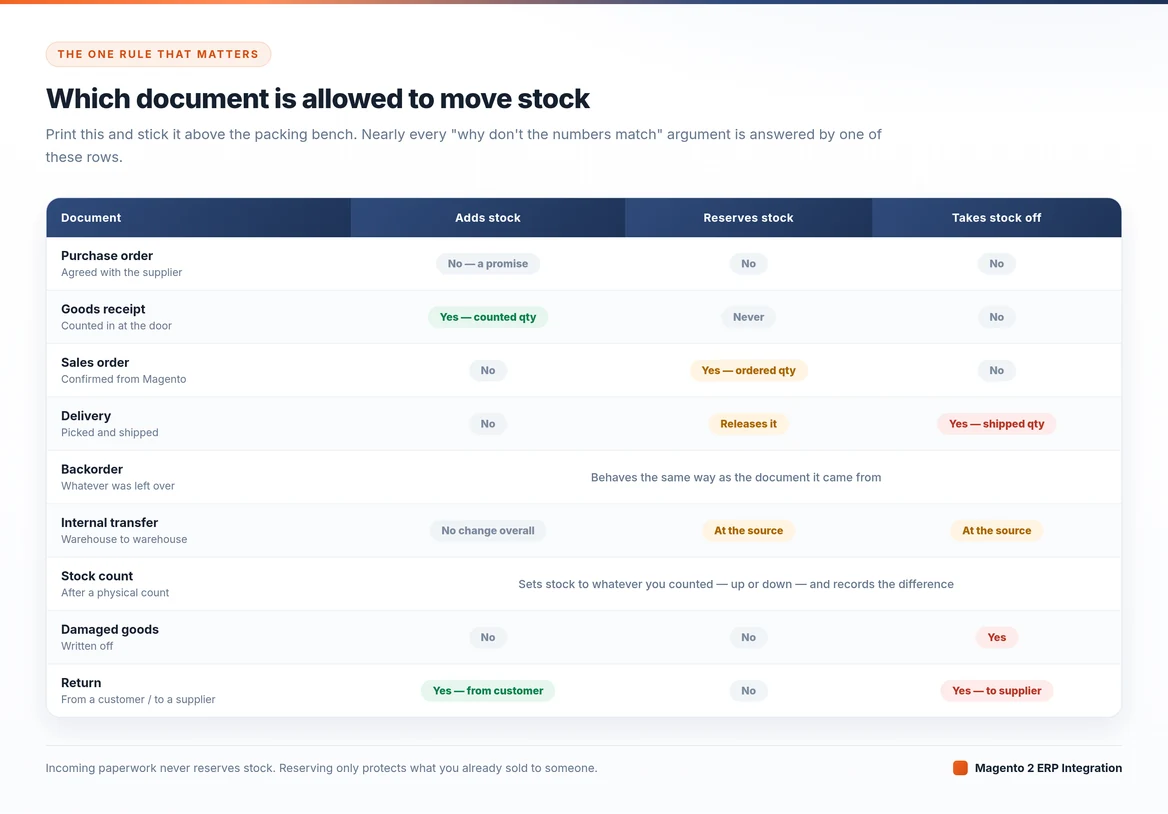
Put simply: a document stays a promise until someone confirms it, and only that confirmation moves stock.
Top ERP platforms for Adobe Commerce
Pick the ERP that suits how you actually work, rather than the one with the biggest name. Three are worth a look.
Odoo
Odoo is the broadest option. It covers stock, buying, manufacturing, accounts, CRM and POS, and a large ecosystem sits behind it.
Choose it if you expect the ERP to run parts of the business well beyond your shop. The Odoo Bridge for Magento 2 keeps products, categories, customers, stock and orders in step across both systems.
ERPNext
ERPNext is the practical middle option: open source, quick to set up, and strong on stock and buying without a big bill.
The ERPNext Multi-Channel Magento 2 Connector handles products, categories, attributes and customers.
It also brings Adobe Commerce orders in, pushes status changes back out, and updates Adobe Commerce stock automatically so you stop overselling.
AureusERP
AureusERP is the newest of the three, and it fits an Adobe Commerce shop most closely.
It is open source, built on Laravel, and released under the MIT licence, so your own developers can read and extend it.
The code sits on GitHub, and plugins make up the system — Sales, Purchases, Inventories, Accounts, Invoices, Payments and Analytics — so you switch on what you need and leave the rest off.
The Aureus ERP Starter Pack covers installation and setup.
| Odoo | ERPNext | AureusERP | |
|---|---|---|---|
| Built with | Python | Python / Frappe | Laravel |
| Licence | Community edition | Open source | MIT, fully open |
| Beyond the shop | Very broad — manufacturing, CRM, HR, POS | Broad | Focused on retail and commerce |
| Setup effort | Highest | Medium | Lowest |
| Pick it if | You will grow past commerce | You want a lot for a small budget | You want code your team can change |
| Magento 2 route | Odoo Bridge | ERPNext Connector | Starter Pack |
Where to start
An Adobe Commerce ERP integration tells you whether you can ship it, what it cost, what is coming in, what you already sold, and what all of it did to your accounts.
So if you reconcile Adobe Commerce against spreadsheets, supplier emails and accounting software that has never seen your orders, you do not have a reporting problem. You have a missing system.
Talk to the Magento development team — an Adobe solutions partner with 14+ years of e-commerce experience — about building the whole layer around the way your warehouse really works.

PakarPBN
A Private Blog Network (PBN) is a collection of websites that are controlled by a single individual or organization and used primarily to build backlinks to a “money site” in order to influence its ranking in search engines such as Google. The core idea behind a PBN is based on the importance of backlinks in Google’s ranking algorithm. Since Google views backlinks as signals of authority and trust, some website owners attempt to artificially create these signals through a controlled network of sites.
In a typical PBN setup, the owner acquires expired or aged domains that already have existing authority, backlinks, and history. These domains are rebuilt with new content and hosted separately, often using different IP addresses, hosting providers, themes, and ownership details to make them appear unrelated. Within the content published on these sites, links are strategically placed that point to the main website the owner wants to rank higher. By doing this, the owner attempts to pass link equity (also known as “link juice”) from the PBN sites to the target website.
The purpose of a PBN is to give the impression that the target website is naturally earning links from multiple independent sources. If done effectively, this can temporarily improve keyword rankings, increase organic visibility, and drive more traffic from search results.