Laravel SaaS SMS Notifications The extension allows tenant admins to send automated SMS alerts for order updates, account activity, and other important events.
Because timely customer communications are critical for important in-store events, SMS alerts help keep customers informed every step of the way.
With this Laravel SaaS extension, you can send automated SMS alerts for order updates, customer sign-ups, and other important store events.
- Tenant admin can send SMS notifications to customers for various store events.
- Additionally, admin can configure SMS notifications for different order statuses from the admin panel.
- You can enable or disable SMS notifications as needed.
- Once configured, the module automatically sends SMS notifications to customers for selected events.
- Furthermore, tenant admins can customize SMS message templates for different notifications.
- As a result, customers receive real-time SMS updates for order placement, order status changes, account registration, and other important store activities.
- Overall, this extension supports automatic SMS sending without any manual intervention.
- Finally, each tenant can set their own SMS notification settings independently.
How to install the module?
First, extract the extension pack and merge it packages folder into the project root directory.
Next, go to bootstrap/providers.php file and add the following lines below providers.
Webkul\SmsNotifications\Providers\SmsNotificationsServiceProvider::class,
Webkul\SmsNotificationsSaas\Providers\SmsNotificationsSaasServiceProvider::class
Then, go to composer.json file and add the following lines below psr-4.
"Webkul\\SmsNotifications\\": "packages/Webkul/SmsNotifications/src",
"Webkul\\SmsNotificationsSaas\\": "packages/Webkul/SmsNotificationsSaas/src"
After that, go to config/concord.php file and add the following lines below providers.
Webkul\SmsNotifications\Providers\ModuleServiceProvider::class
Finally, run the command below to complete the setup.
composer dump-autoload
php artisan sms-notifications-saas:install
Super Admins can easily manage and control which tenants have access to the SMS Notification module from a single dashboard.
Additionally, each tenant gets an isolated SMS notification configuration, which keeps messages, settings, and logs secure and company-specific.
As a result, Super Admin manages module access centrally, while each tenant configures and sends SMS notifications for their own stores.
To get started, tenants can access the SMS Notification module by navigating to Admin Panel → Configuration → SMS Notificationsas shown in the image below.
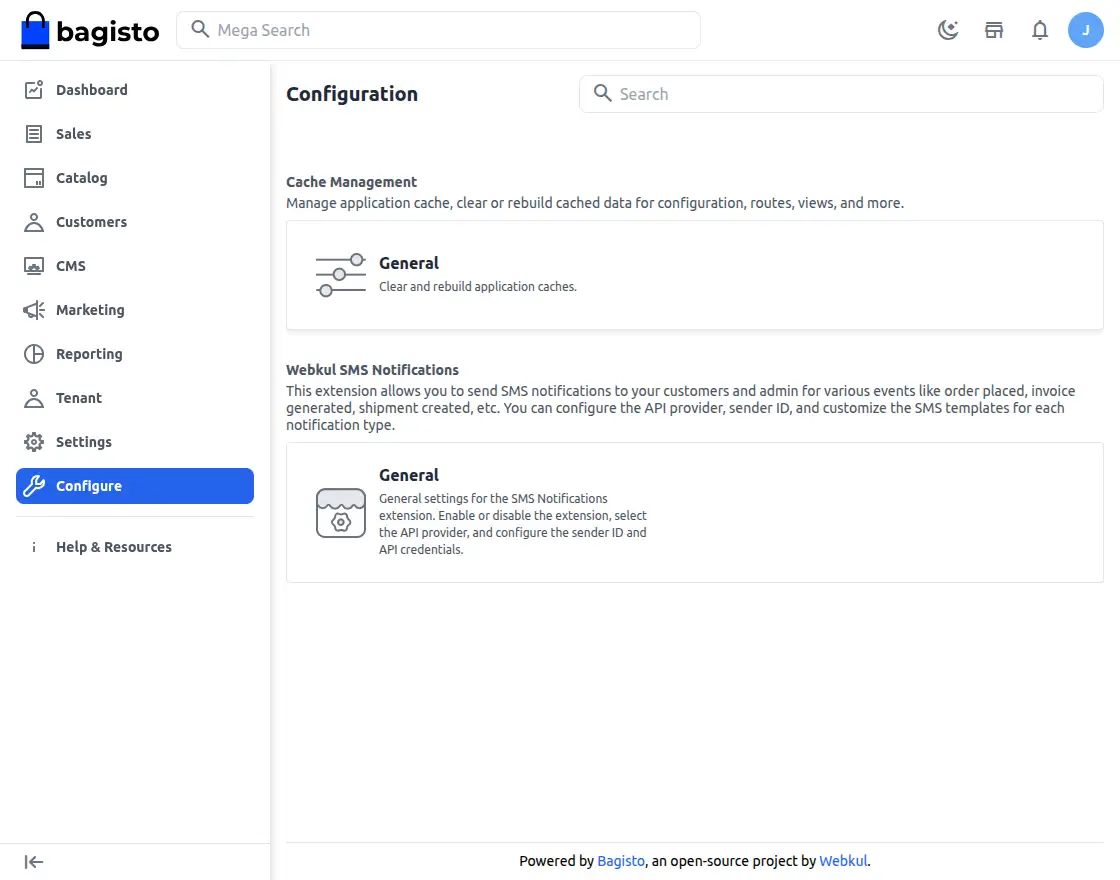
Above, you will find Webkul SMS Notification General settings, as explained below:-
Here, you can setup the SMS Notification module by configuring provider details and default SMS options.
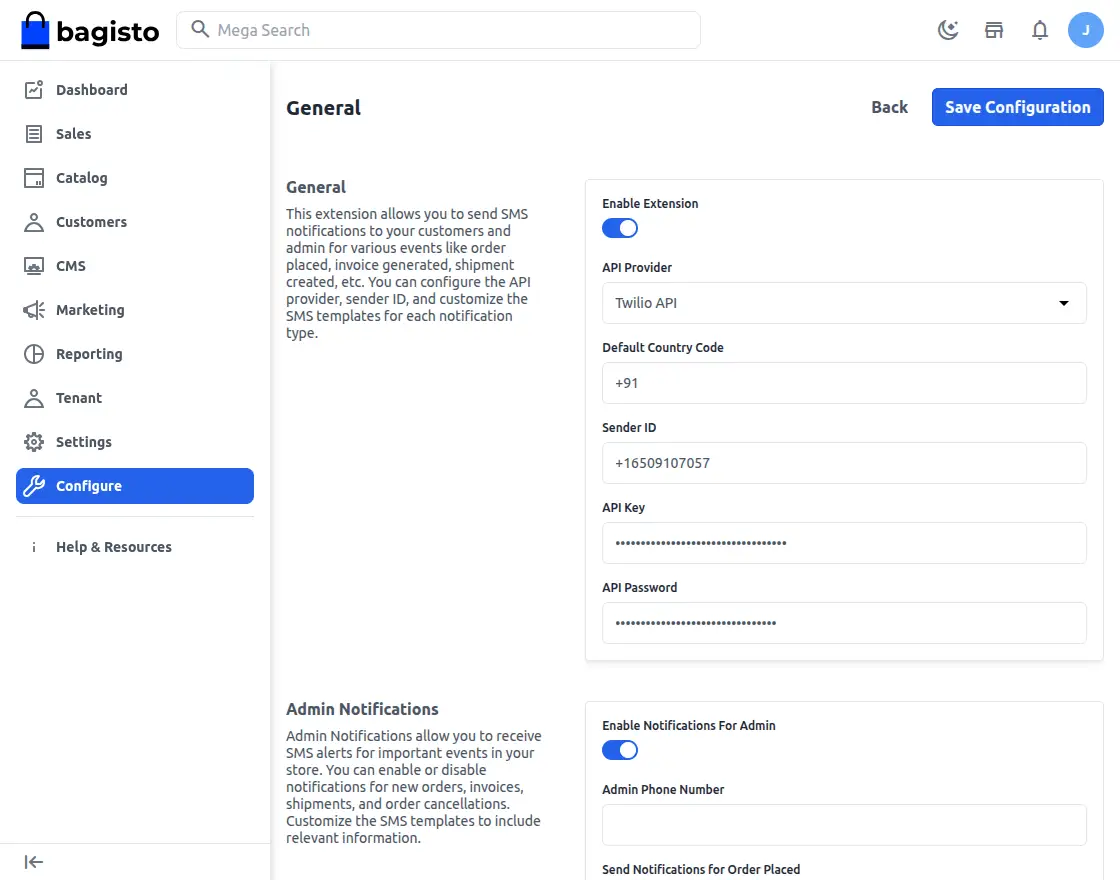
Enable Extensions – Using the toggle button, admin can enable or disable this module.
Api Provider – Here, select the API provider used to send SMS notifications.
Default Country Code – Next, enter the default country code that will be used for SMS notifications.
Sender ID — Then, determine the sender ID that will be used for SMS notifications.
API Key — After that, enter the API key provided by your SMS service provider.
API Password — Finally, enter the API password provided by your SMS service provider.
In this section, you can configure admin SMS notifications for important store events and updates.
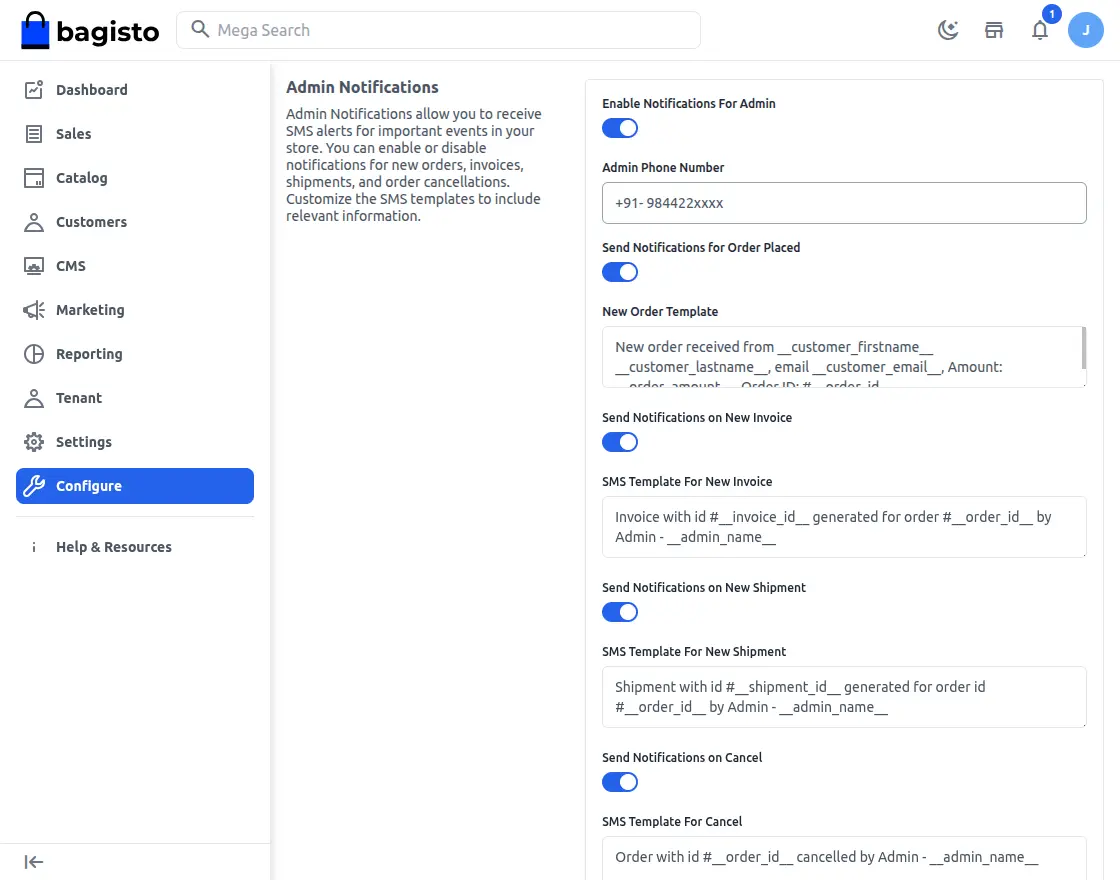
- Enable Notifications for Admin – Enables admin SMS alerts for selected store events.
- Admin Telephone Number – Determine the cellphone number used for admin SMS notifications.
- Order Placed Notification – As soon as a customer places a new order, it will trigger an SMS alert.
- New Order Template – Defines SMS templates for new order updates.
- New Invoice SMS – Every time a new invoice is created, the admin will be immediately notified.
- SMS Template for New Invoice – Defines SMS content for invoice updates.
- SMS sending – Once a shipment is made for an order, it will immediately notify the admin.
- SMS Template for New Delivery – Defines SMS templates for sending updates.
- Cancel SMS – If the order is cancelled, it will notify the admin without delay.
- SMS Template for Cancellation – Define SMS content for order cancellation updates.
- Customer Registration Notice – As soon as a new customer registers on the store, it will notify the admin.
Customer Registration Template – Determine the SMS template used for customer registration notifications.
Likewise, you can configure customer SMS notifications for order updates, account activity, and other important store events.
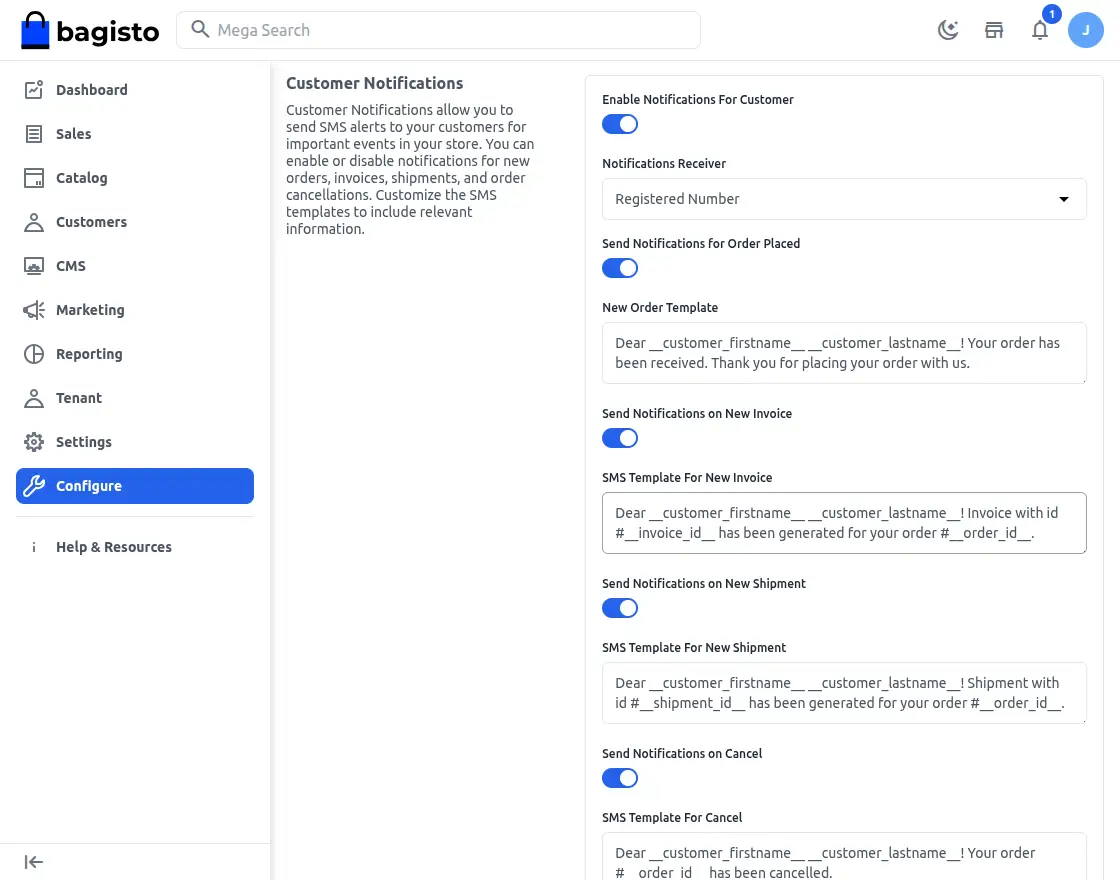
Enable Notifications for Customers – Enable SMS notifications for customers for selected accounts and order related events.
Notification Recipient – Allows you to select the source of the customer’s phone number for sending SMS notifications.
Send Notifications for Placed Orders – Once a new order is successfully placed, it will send an SMS to the customer.
New Order Template – Determine the SMS template used to notify customers of successful order placement.
Invoice Notification – Every time a new invoice is created for an order, the customer will be notified via SMS.
SMS Template for New Invoice – Allows admins to customize the SMS content sent for invoice creation notifications.
New Delivery Notification – As soon as an order delivery is created, it sends an SMS to the customer.
SMS Template for New Delivery – Defines SMS templates used for customer notifications regarding shipments.
Order Canceled SMS – Whenever a purchase is cancelled, it triggers an SMS alert to notify the customer.
SMS Template for Cancellation – Allows admin to define SMS messages sent for order cancellation updates.
Login Successful – After successful account login, it sends an SMS notification to the customer.
SMS Templates for Successful Login – Defines the SMS content sent to customers after successful login.
Registration Successful – Once the account registration is complete, it will send an SMS to the customer.
SMS Template for Successful Registration – Allows admin to configure SMS messages sent after customer registration.
Reset Password – Once the account password is reset, it will send an SMS notification to the customer.
SMS Template for Password Reset – Determines the SMS content used for password reset notifications
SMS Alerts for Store Events
Overall, the SMS Notifications module automatically sends SMS alerts for orders, accounts, and other important store events.
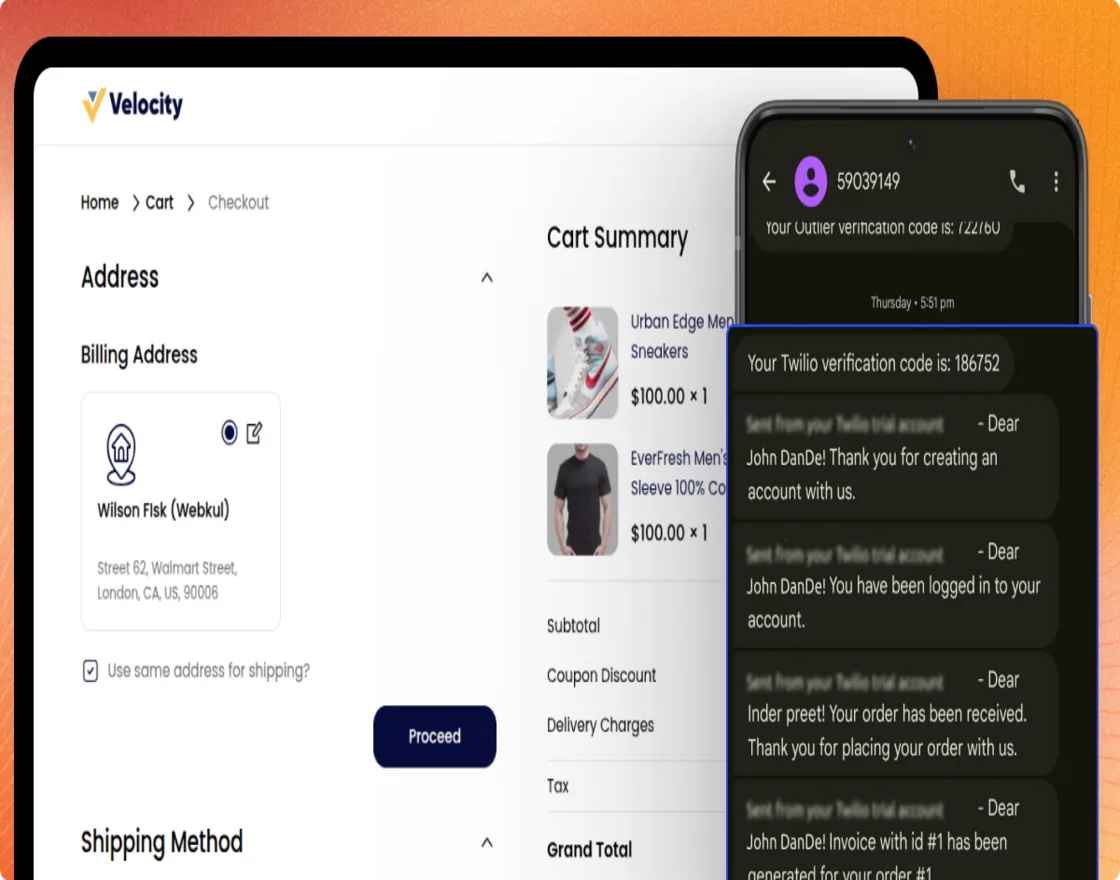
Additionally, you can activate each event individually and assign separate SMS templates for admin and customer notifications.
Support and Contact Information
That’s all for the User Guide Laravel SaaS SMS Notifications. For any questions or doubts, feel free to contact us at [email protected].
Alternatively, you can submit a ticket through us HelpDesk system.
Also, please explore us Laravel Development Services and Quality Bagisto Extension .
Current Product Version – v2.4.x
Supported Framework Version – v2.4

PakarPBN
A Private Blog Network (PBN) is a collection of websites that are controlled by a single individual or organization and used primarily to build backlinks to a “money site” in order to influence its ranking in search engines such as Google. The core idea behind a PBN is based on the importance of backlinks in Google’s ranking algorithm. Since Google views backlinks as signals of authority and trust, some website owners attempt to artificially create these signals through a controlled network of sites.
In a typical PBN setup, the owner acquires expired or aged domains that already have existing authority, backlinks, and history. These domains are rebuilt with new content and hosted separately, often using different IP addresses, hosting providers, themes, and ownership details to make them appear unrelated. Within the content published on these sites, links are strategically placed that point to the main website the owner wants to rank higher. By doing this, the owner attempts to pass link equity (also known as “link juice”) from the PBN sites to the target website.
The purpose of a PBN is to give the impression that the target website is naturally earning links from multiple independent sources. If done effectively, this can temporarily improve keyword rankings, increase organic visibility, and drive more traffic from search results.